
Admission Application Dashboard – Approved for Admission(Pay Fee)
Overview
The Applicant Dashboard provides a consolidated view of all school applications submitted under a student profile.
Applicants can:
- View profile information
- Track school-wise application status
- Review admission decisions
- Complete next steps after approval
Navigation
Admission Application Dashboard → Applicants → Student Profile → School Applications
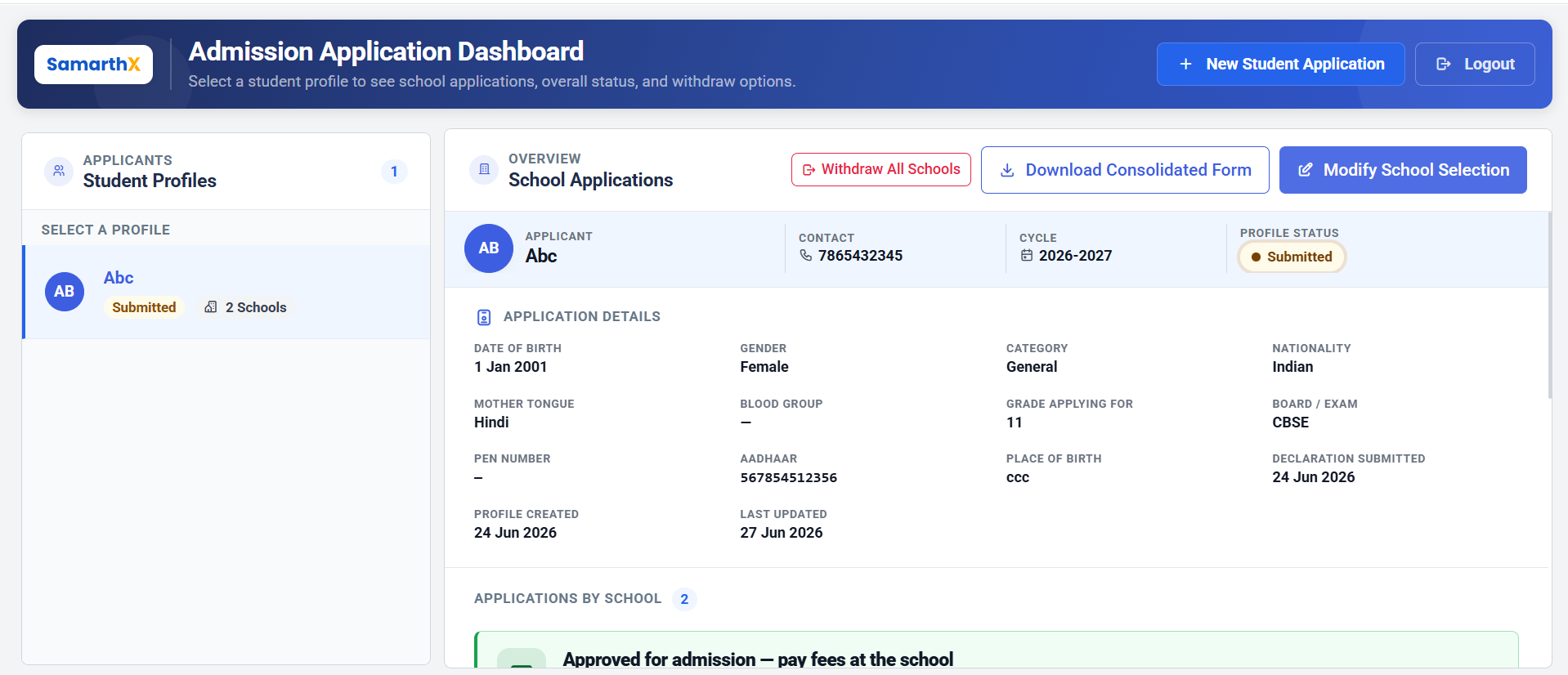
Applicant Information
Profile Details
| Field | Description |
|---|---|
| Applicant | Student Name |
| Contact | Registered Mobile Number |
| Admission Cycle | Selected Admission Cycle |
| Profile Status | Overall Application Status |
Application Details
Displays student information submitted during the admission process.
Information Displayed
- Date of Birth
- Gender
- Category
- Nationality
- Mother Tongue
- Blood Group
- Grade Applying For
- Board / Examination
- PEN Number
- Aadhaar Number
- Place of Birth
- Declaration Submission Date
- Profile Created Date
- Last Updated Date
School Applications
Displays all schools selected during the application process along with their current admission status.
Information Available
- School Name
- Application Number
- School Reference Number
- Application Status
- Grade
- Academic Year
- Admission Cycle
- Stream
- Submission Date
- Last Updated Date
Approved for Admission
When a school approves an applicant for admission, an approval notification is displayed.
Approval Notification
Applicants are informed that:
- Admission has been approved by the school.
- Admission fees must be paid directly to the school.
- SamarthX does not collect school admission fees.
- Fee payment instructions are determined by the school.
Possible Payment Methods
- School Fee Counter
- Bank Transfer
- Bank Challan
- Online Payment Link provided by the school
- Any other method communicated by the school
Action Required: Pay Fees
For schools marked as Approved for Admission (Pay Fees), applicants must complete the admission fee payment process.
Applicant Actions
- Review approval notification.
- Contact or visit the approved school.
- Follow the school's fee payment instructions.
- Complete admission formalities.
- Confirm enrolment with the school.
School Application Statuses
Submitted
Application has been successfully submitted and is awaiting review.
Under Review
The school is reviewing the application and submitted documents.
Approved for Admission (Pay Fees)
The applicant has been approved for admission and must complete fee payment directly with the school.
Rejected
The application has not been approved by the school.
Withdrawn
The application has been withdrawn by the applicant.
Admission Approval Workflow
Applicant Submits Application
        ↓
School Reviews Application
        ↓
Admission Decision
        ↓
Approved for Admission
        ↓
Applicant Receives Approval Notification
        ↓
Applicant Pays Fees Directly to School
        ↓
School Confirms Payment
        ↓
Admission Confirmed
        ↓
Student Enrolled
Multi-School Approval Workflow
Applicant Applies to Multiple Schools
        ↓
Schools Review Applications
        ↓
One or More Schools Approve Admission
        ↓
Applicant Reviews Approved Schools
        ↓
Applicant Selects Preferred School
        ↓
Applicant Pays Fees to Selected School
        ↓
Admission Confirmed at Chosen School