
Employee Management
Overview
The Employee Management module provides a centralized platform for managing teaching, non-teaching, and vocational staff across schools. It enables administrators to monitor staff records, track profile completion, manage employment information, and maintain workforce data.
Employee Management Dashboard
Dashboard Summary
The dashboard provides a high-level overview of staff distribution and status.
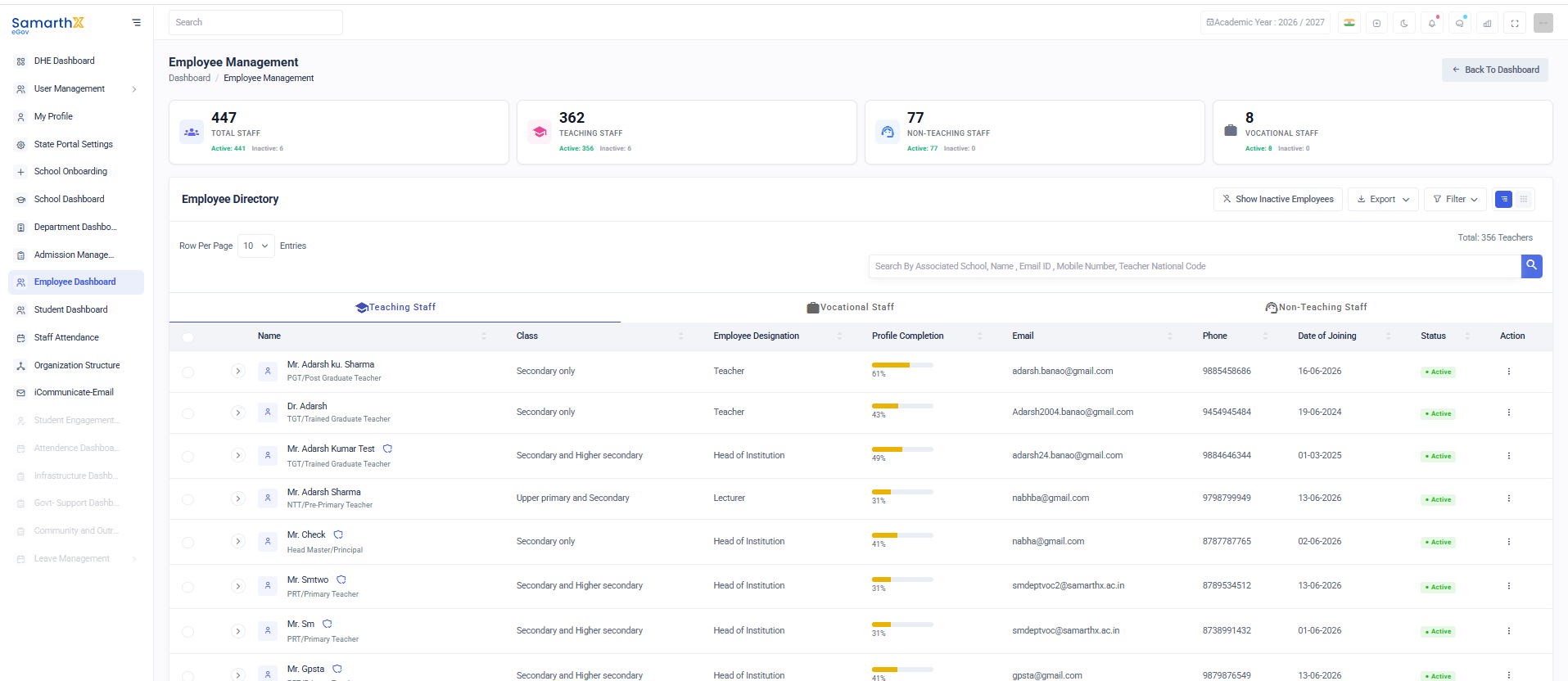
Summary Cards
| Metric | Description |
|---|---|
| Total Staff | Total number of employees in the system |
| Teaching Staff | Total teaching staff members |
| Non-Teaching Staff | Total non-teaching staff members |
| Vocational Staff | Total vocational staff members |
Each card also displays:
- Active Employees
- Inactive Employees
Employee Directory
The Employee Directory displays all employee records in a searchable and filterable table.
Available Tabs
- Teaching Staff
- Non-Teaching Staff
- Vocational Staff
Employee Directory Fields
| Column | Description |
|---|---|
| Name | Employee name |
| Employee Type | Designation/Role category |
| Class | Classes assigned to employee |
| Employee Designation | Official designation |
| Profile Completion | Percentage of profile completion |
| Registered email address | |
| Phone | Contact number |
| Date of Joining | Employee joining date |
| Status | Active/Inactive status |
| Action | Employee management actions |
Search Employees
Users can search employees using:
- Associated School
- Employee Name
- Email ID
- Mobile Number
- Teacher National Code
Filters
The Filter option allows users to narrow employee records based on configured criteria such as:
- Employee Type
- Designation
- Status
- School
- Joining Date
- Profile Completion
Employee Categories
Teaching Staff
Includes employees directly involved in classroom teaching.
Examples:
- PRT (Primary Teacher)
- TGT (Trained Graduate Teacher)
- PGT (Post Graduate Teacher)
- Lecturer
- Head Master / Principal
- Head of Institution
Non-Teaching Staff
Includes employees responsible for administrative and operational activities.
Examples:
- Administrative Officer
- Clerk
- Accountant
- Librarian
- Laboratory Assistant
- Office Staff
Vocational Staff
Includes employees responsible for vocational and skill-based education programs.
Examples:
- Vocational Trainer
- Skill Development Instructor
- Industry Expert
- Technical Instructor
Profile Completion Tracking
The system tracks profile completion for every employee.
Profile Completion Includes
- Personal Information
- Contact Information
- Educational Qualifications
- Professional Qualifications
- Employment Details
- Document Uploads
- Service Information
Profile completion percentage helps administrators identify incomplete employee records.
Employee Status
| Status | Description |
|---|---|
| Active | Employee is currently active in service |
| Inactive | Employee is not currently active |
| Transferred | Employee transferred to another school |
| Retired | Employee retired from service |
| Resigned | Employee resigned from service |
Directory Actions
Available Actions
- View Employee Profile
- Edit Employee Information
- Update Employment Details
- Activate Employee
- Deactivate Employee
- Transfer Employee
- Export Employee Records
Export Employee Data
The Export feature allows administrators to download employee information for reporting and audit purposes.
Export Capabilities
- Export all employees
- Export filtered employees
- Download workforce reports
- Generate administrative reports
Employee Profile Management
Employee Profile Overview
Selecting an employee opens the detailed employee profile.
Profile Information
| Section | Description |
|---|---|
| Personal Information | Employee personal details |
| Contact Information | Communication details |
| Professional Details | Designation and role information |
| Educational Qualifications | Academic records |
| Employment Details | Service and appointment information |
| Documents | Uploaded supporting documents |
| Service History | Employee service records |
Personal Information
Typical employee profile details include:
- Full Name
- Gender
- Date of Birth
- Nationality
- Category
- Religion
- Blood Group
- Marital Status
Contact Information
- Mobile Number
- Alternate Mobile Number
- Email Address
- Permanent Address
- Correspondence Address
Professional Information
- Employee ID
- Teacher National Code
- Designation
- Employee Category
- Subject Specialization
- School Assignment
- Employment Type
- Date of Joining
Educational Qualifications
Employee qualification records may include:
- Graduation
- Post Graduation
- B.Ed.
- M.Ed.
- Diploma Certifications
- Professional Certifications
Documents
The Documents section stores employee-related documents.
Common Documents
- Identity Proof
- Address Proof
- Educational Certificates
- Professional Certificates
- Appointment Letter
- Service Book Records
- Experience Certificates
Available Actions
- Upload Documents
- View Documents
- Download Documents
- Verify Documents
User Actions
Dashboard Actions
- Search employees
- Filter employee records
- Switch between employee categories
- Export employee data
- View employee profiles
Employee Actions
- Update profile information
- Manage employment details
- Upload supporting documents
- Track profile completion
- Review service records
Employee Details –
Overview
The Employee Details page provides a comprehensive view of an employee's personal, professional, and organizational information. Authorized users can review employee records, qualifications, job assignments, transfer history, and other employment-related details.
Navigation
Dashboard → Employee Dashboard → Employee Details
Page Header
The page header displays:
- Employee Name
- Employee Profile Icon
- Joining Date
- Back to Dashboard button
- Login Details button
Tabs Available
The Employee Details page contains the following tabs:
| Tab | Description |
|---|---|
| Professional Info | Employee profile and employment details |
| Qualifications | Educational qualifications and certifications |
| Job Assignment | Current and past job assignments |
| Transfer History | Employee transfer records |
| Switch History | Employee role/designation changes |
| Deputation History | Deputation and assignment records |
Personal Details
Displays basic employee information.
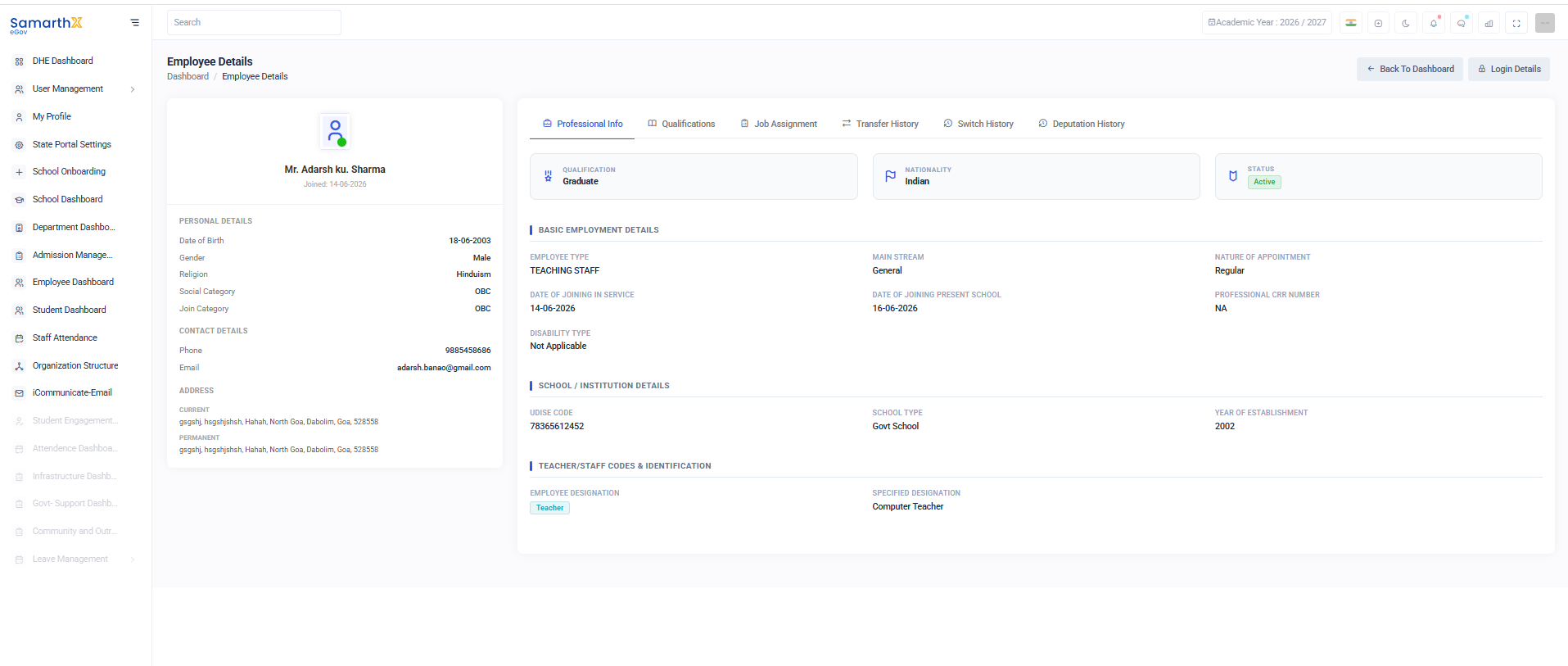
Information Available
- Date of Birth
- Gender
- Religion
- Social Category
- Join Category
Contact Details
Displays employee contact information.
Information Available
- Phone Number
- Email Address
Address Information
Current Address
Displays the employee's current residential address.
Permanent Address
Displays the employee's permanent residential address.
Professional Information
The Professional Info section displays employment-related information.
Summary Information
| Field | Description |
|---|---|
| Qualification | Highest educational qualification |
| Nationality | Employee nationality |
| Status | Employment status |
Basic Employment Details
Information Available
- Employee Type
- Main Stream
- Nature of Appointment
- Date of Joining in Service
- Date of Joining Present School
- Professional CRR Number
- Disability Type
School / Institution Details
Displays information about the assigned institution.
Information Available
- UDISE Code
- School Type
- Year of Establishment
Teacher/Staff Codes & Identification
Displays employee designation details.
Information Available
- Employee Designation
- Specified Designation
User Actions
View Professional Information
- Open the Employee Details page.
- Select the Professional Info tab.
- Review employee and institution information.
View Qualifications
- Select the Qualifications tab.
- Review educational qualifications and certifications.
View Transfer History
- Select the Transfer History tab.
- Review transfer records and movement history.
Return to Dashboard
- Click Back to Dashboard.
- The system redirects to the main dashboard.
Security and Access Control
- Employee information is accessible only to authorized users.
- Personal and employment records are protected through role-based permissions.
- Users should not share employee information without authorization.
Troubleshooting
| Issue | Resolution |
|---|---|
| Employee details not visible | Verify access permissions |
| Missing employee information | Contact system administrator |
| Unable to access tabs | Refresh the page and retry |
| Page not loading | Check internet connectivity |
Related Modules
- Employee Dashboard
- User Management
- School Dashboard
- Staff Attendance
- Leave Management
- Transfer Management
Purpose
The Employee Details page serves as a centralized repository for employee information, enabling administrators and authorized personnel to manage and review employee records efficiently.
Access Control
| Role | Permissions |
|---|---|
| State Administrator | Manage all employee records |
| Department Administrator | Monitor and review employee data |
| School Administrator | Manage school employee records |
| HR Administrator | Maintain employee profiles and employment data |
| Authorized Staff | View and update records based on assigned permissions |
Benefits
- Centralized employee management
- Complete workforce visibility
- Profile completion monitoring
- Improved data accuracy
- Streamlined HR processes
- Efficient staff reporting
- Better compliance and audit readiness