
Employee Management
Employee Management Dashboard
Overview
The Employee Management module provides a centralized platform for managing teaching, non-teaching, and vocational staff across schools. It enables administrators to monitor staff records, track profile completion, manage employment information, and maintain workforce data.
Employee Management Dashboard
Dashboard Summary
The dashboard provides a high-level overview of staff distribution and status.
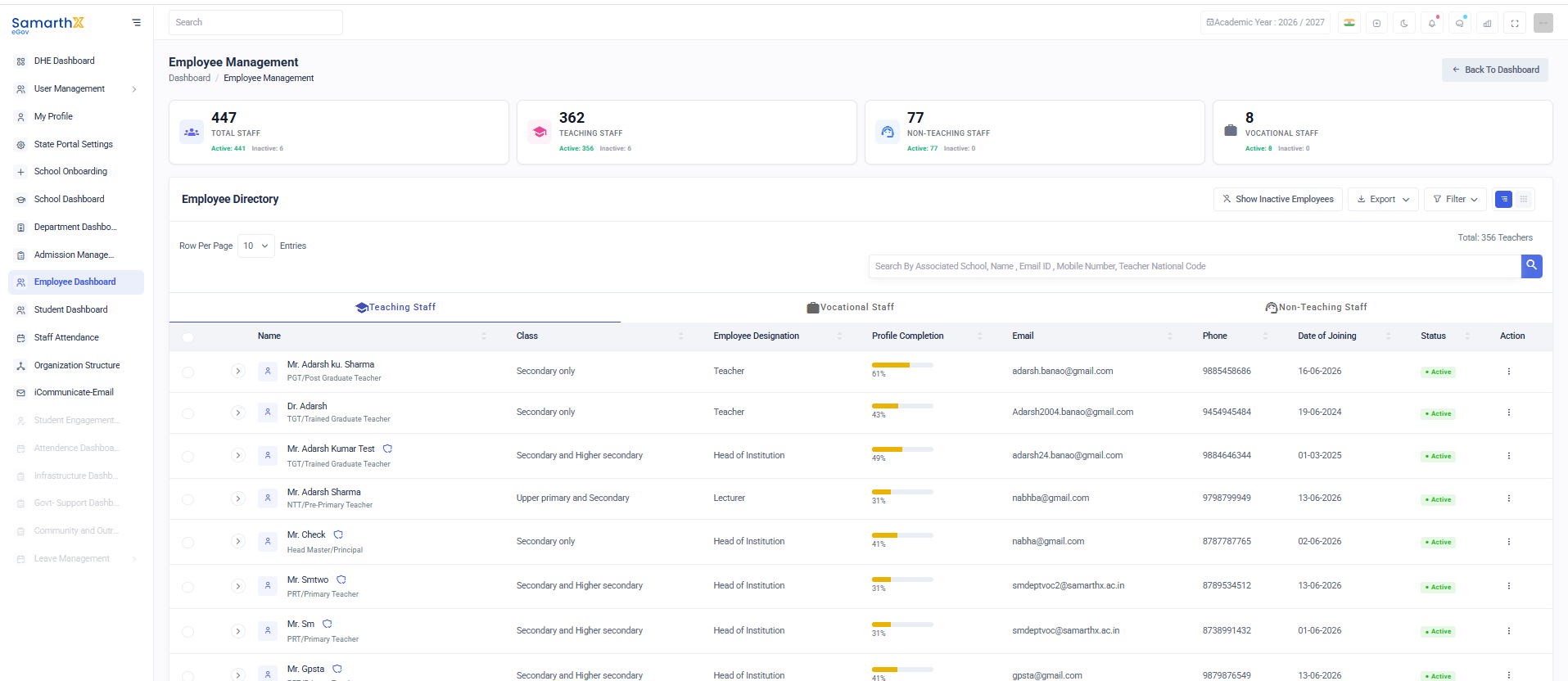
Summary Cards
| Metric | Description |
|---|---|
| Total Staff | Total number of employees in the system |
| Teaching Staff | Total teaching staff members |
| Non-Teaching Staff | Total non-teaching staff members |
| Vocational Staff | Total vocational staff members |
Each card also displays:
- Active Employees
- Inactive Employees
Employee Directory
The Employee Directory displays all employee records in a searchable and filterable table.
Available Tabs
- Teaching Staff
- Non-Teaching Staff
- Vocational Staff
Employee Directory Fields
| Column | Description |
|---|---|
| Name | Employee name |
| Employee Type | Designation/Role category |
| Class | Classes assigned to employee |
| Employee Designation | Official designation |
| Profile Completion | Percentage of profile completion |
| Registered email address | |
| Phone | Contact number |
| Date of Joining | Employee joining date |
| Status | Active/Inactive status |
| Action | Employee management actions |
Search Employees
Users can search employees using:
- Associated School
- Employee Name
- Email ID
- Mobile Number
- Teacher National Code
Filters
The Filter option allows users to narrow employee records based on configured criteria such as:on:
- Employee Type
- Designation
- Status
- School
- Joining Date
- Profile Completion
Employee Categories
Teaching Staff
Includes employees directly involved in classroom teaching.
Examples:
- PRT (Primary Teacher)
- TGT (Trained Graduate Teacher)
- PGT (Post Graduate Teacher)
- Lecturer
- Head Master / Principal
- Head of Institution
Non-Teaching Staff
Includes employees responsible for administrative and operational activities.
Examples:
- Administrative Officer
- Clerk
- Accountant
- Librarian
- Laboratory Assistant
- Office Staff
Vocational Staff
Includes employees responsible for vocational and skill-based education programs.
Examples:
- Vocational Trainer
- Skill Development Instructor
- Industry Expert
- Technical Instructor
Profile Completion Tracking
The system tracks profile completion for every employee.
Profile Completion Includes
Personal InformationContact InformationEducational QualificationsProfessional QualificationsEmployment DetailsDocument UploadsService Information
Profile completion percentage helps administrators identify incomplete employee records.
Employee Status
| Status | Description |
|---|---|
| Active | Employee is currently active in service |
| Inactive | Employee is not currently active |
| Transferred | Employee transferred to another school |
| Retired | Employee retired from service |
| Resigned | Employee resigned from service |
Directory Actions
Available Actions
- View Employee Profile
- Edit Employee Information
- Update Employment Details
- Activate Employee
- Deactivate Employee
- Transfer Employee
- Export Employee Records
Export Employee Data
The Export feature allows administrators to download employee information for reporting and audit purposes.
Export Capabilities
- Export all employees
- Export filtered employees
- Download workforce reports
- Generate administrative reports
Employee Profile Management
Overview
Selecting an employee opens the detailed employee profile.
Profile Information
Personal Information
Typical employee profile details include:
Full NameGenderDate of BirthNationalityCategoryReligionBlood GroupMarital Status
Contact Information
Mobile NumberAlternate Mobile NumberEmail AddressPermanent AddressCorrespondence Address
Professional Information
Employee IDTeacher National CodeDesignationEmployee CategorySubject SpecializationSchool AssignmentEmployment TypeDate of Joining
Educational Qualifications
Employee qualification records may include:
GraduationPost GraduationB.Ed.M.Ed.Diploma CertificationsProfessional Certifications
Documents
The Documents section stores employee-related documents.
Common Documents
Identity ProofAddress ProofEducational CertificatesProfessional CertificatesAppointment LetterService Book RecordsExperience Certificates
Available Actions
Upload DocumentsView DocumentsDownload DocumentsVerify Documents
User Actions
Dashboard Actions
Search employeesFilter employee recordsSwitch between employee categoriesExport employee dataView employee profiles
Employee Actions
Update profile informationManage employment detailsUpload supporting documentsTrack profile completionReview service records
Employee Details –
Overview
The Employee Details page provides a comprehensive view of an employee's personal, professional, and organizational information. Authorized users can review employee records, qualifications, job assignments, transfer history, and other employment-related details.
Navigation
Dashboard → Employee Dashboard → Employee Details
Page Header
The page header displays:
Employee NameEmployee Profile IconJoining DateBack to Dashboard buttonLogin Details button
Tabs Available
The Employee Details page contains the following tabs:
Personal Details
Displays basic employee information.
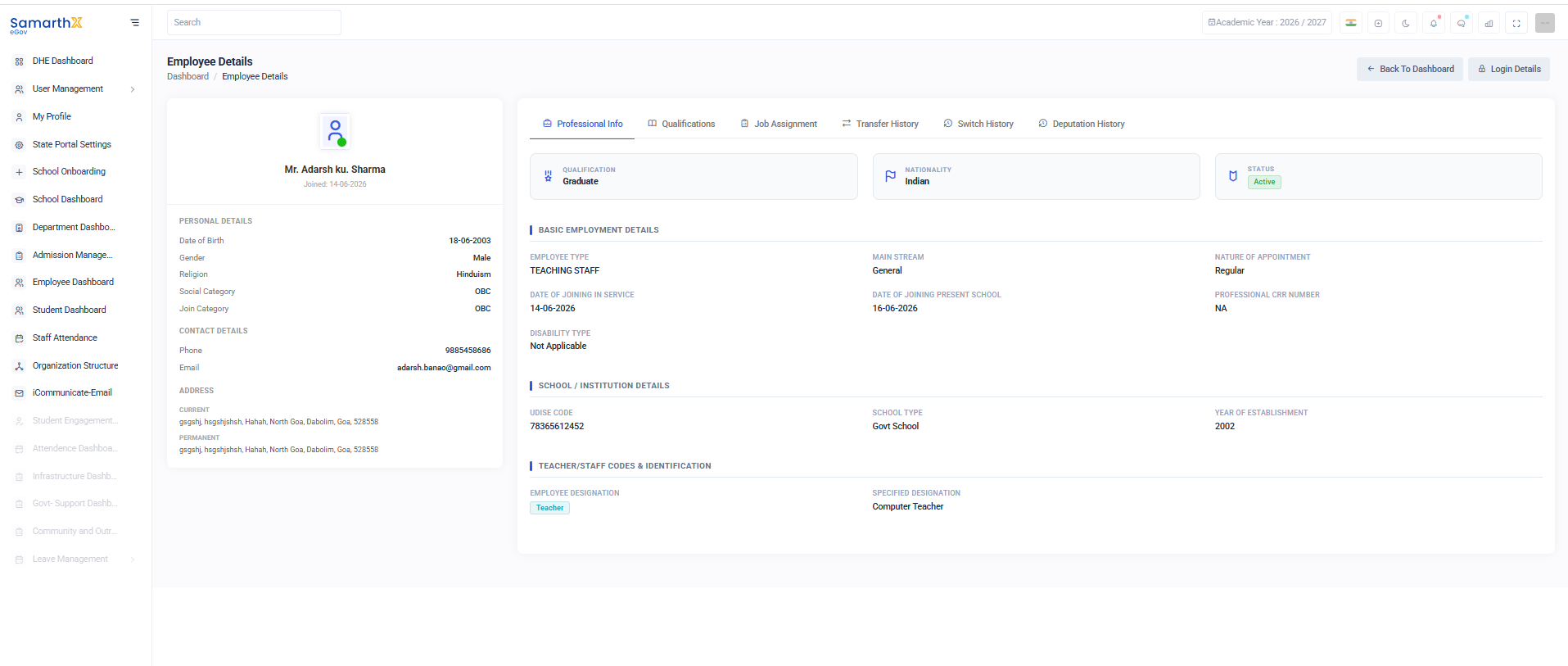
Information Available
Date of BirthGenderReligionSocial CategoryJoin Category
Contact Details
Displays employee contact information.
Information Available
Phone NumberEmail Address
Address Information
Current Address
Displays the employee's current residential address.
Permanent Address
Displays the employee's permanent residential address.
Professional Information
The Professional Info section displays employment-related information.
Summary Information
Basic Employment Details
Information Available
Employee TypeMain StreamNature of AppointmentDate of Joining in ServiceDate of Joining Present SchoolProfessional CRR NumberDisability Type
School / Institution Details
Displays information about the assigned institution.
Information Available
UDISE CodeSchool TypeYear of Establishment
Teacher/Staff Codes & Identification
Displays employee designation details.
Information Available
Employee DesignationSpecified Designation
User Actions
View Professional Information
Open the Employee Details page.Select theProfessional Infotab.Review employee and institution information.
View Qualifications
Select theQualificationstab.Review educational qualifications and certifications.
View Transfer History
Select theTransfer Historytab.Review transfer records and movement history.
Return to Dashboard
ClickBack to Dashboard.The system redirects to the main dashboard.
Security and Access Control
Employee information is accessible only to authorized users.Personal and employment records are protected through role-based permissions.Users should not share employee information without authorization.
Purpose
The Employee Details page serves as a centralized repository for employee information, enabling administrators and authorized personnel to manage and review employee records efficiently.