
Employee Module- User Guide- Dashboard
Employee Management Dashboard
Overview
The Employee Management module provides a centralized platform for managing teaching, non-teaching, and vocational staff across schools. It enables administrators to monitor staff records, track profile completion, manage employment information, and maintain workforce data.
Dashboard Summary
The dashboard provides a high-level overview of staff distribution and status.
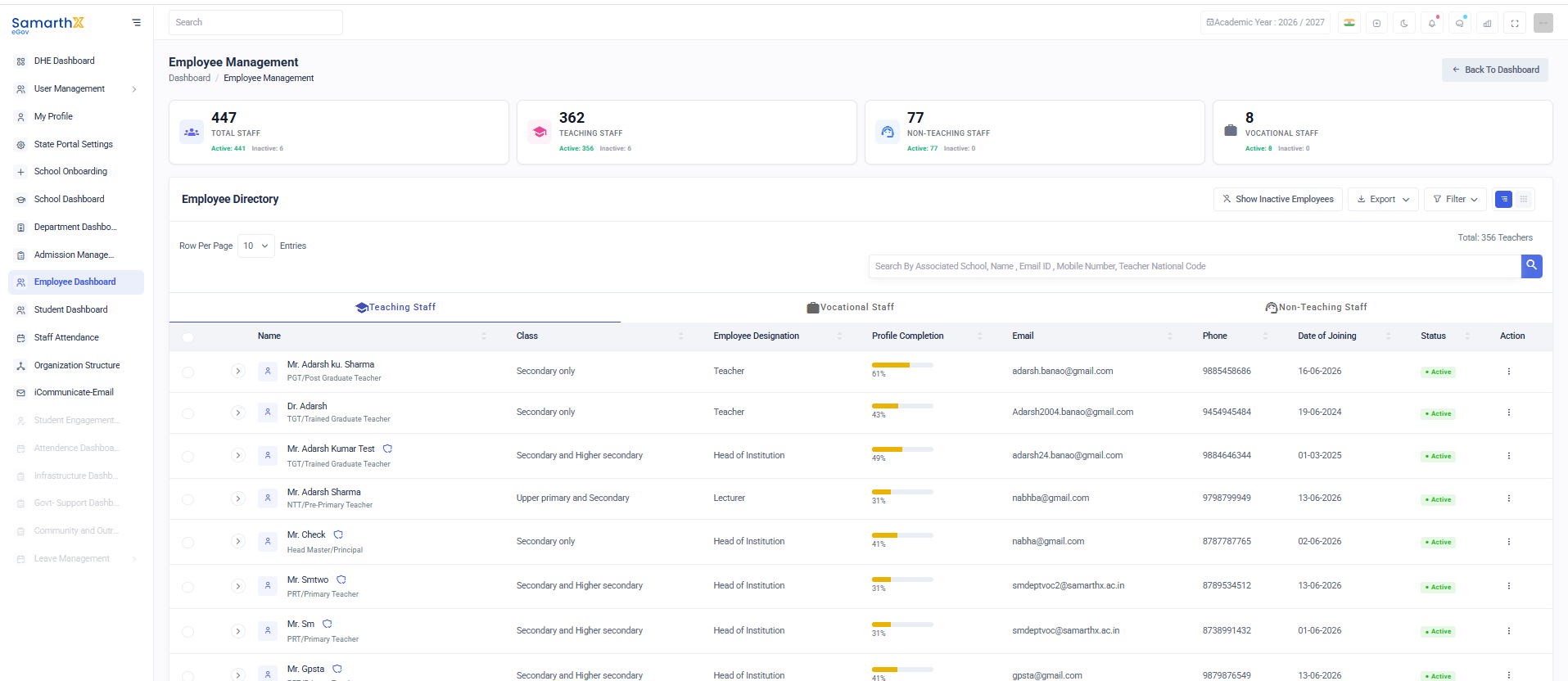
Summary Cards
| Metric | Description |
|---|---|
| Total Staff | Total number of employees in the system |
| Teaching Staff | Total teaching staff members |
| Non-Teaching Staff | Total non-teaching staff members |
| Vocational Staff | Total vocational staff members |
Each card also displays:
- Active Employees
- Inactive Employees
Employee Directory
The Employee Directory displays all employee records in a searchable and filterable table.
Available Tabs
- Teaching Staff
- Non-Teaching Staff
- Vocational Staff
Employee Directory Fields
| Column | Description |
|---|---|
| Name | Employee name |
| Employee Type | Designation/Role category |
| Class | Classes assigned to employee |
| Employee Designation | Official designation |
| Profile Completion | Percentage of profile completion |
| Registered email address | |
| Phone | Contact number |
| Date of Joining | Employee joining date |
| Status | Active/Inactive status |
| Action | Employee management actions |
Search Employees
Users can search employees using:
- Associated School
- Employee Name
- Email ID
- Mobile Number
- Teacher National Code
Filters
The Filter option allows users to narrow employee records based on:
- Employee Type
- Designation
- Status
- School
- Joining Date
- Profile Completion
Employee Categories
Teaching Staff
Includes employees directly involved in classroom teaching.
Examples:
- PRT (Primary Teacher)
- TGT (Trained Graduate Teacher)
- PGT (Post Graduate Teacher)
- Lecturer
- Head Master / Principal
- Head of Institution
Non-Teaching Staff
Includes employees responsible for administrative and operational activities.
Examples:
- Administrative Officer
- Clerk
- Accountant
- Librarian
- Laboratory Assistant
- Office Staff
Vocational Staff
Includes employees responsible for vocational and skill-based education programs.
Examples:
- Vocational Trainer
- Skill Development Instructor
- Industry Expert
- Technical Instructor
Employee Status
| Status | Description |
|---|---|
| Active | Employee is currently active in service |
| Inactive | Employee is not currently active |
| Transferred | Employee transferred to another school |
| Retired | Employee retired from service |
| Resigned | Employee resigned from service |
Directory Actions
Available Actions
- View Employee Profile
- Edit Employee Information
- Update Employment Details
- Activate Employee
- Deactivate Employee
- Transfer Employee
- Export Employee Records
Export Employee Data
The Export feature allows administrators to download employee information for reporting and audit purposes.
Export Capabilities
- Export all employees
- Export filtered employees
- Download workforce reports
- Generate administrative reports