
Leave Management – User Guide
Leave Management Dashboard
Overview
The Leave Management module provides a centralized platform for managing leave types, leave requests, approval workflows, leave calendars, and leave-related configurations.
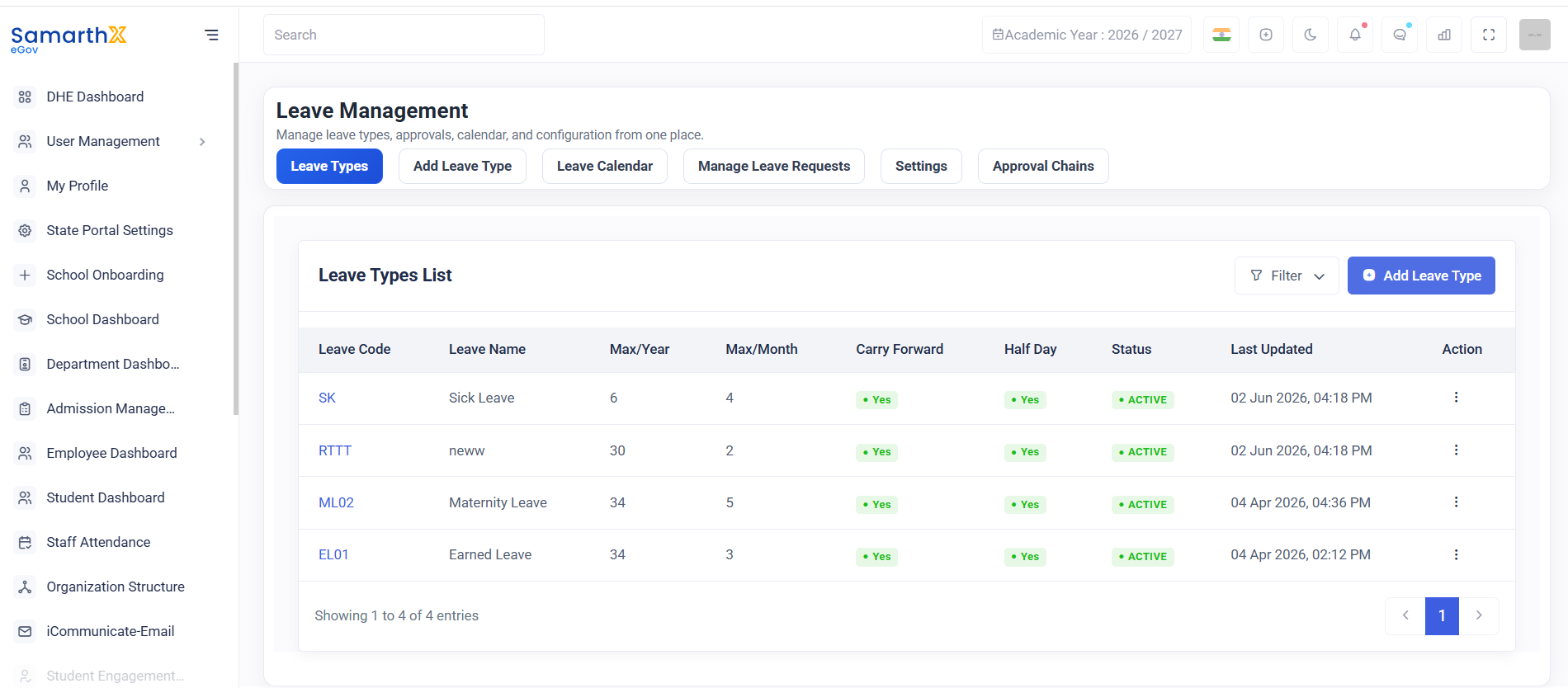
Navigation
Dashboard → Leave Management
Available Sections
| Section | Description |
|---|---|
| Leave Types | Configure and manage leave categories |
| Add Leave Type | Create new leave types |
| Leave Calendar | View leave schedules and holidays |
| Manage Leave Requests | Review and process leave applications |
| Settings | Configure leave policies and rules |
| Approval Chains | Define leave approval workflows |
Leave Types
The Leave Types section displays all configured leave categories and their settings.
Available Information
| Field | Description |
|---|---|
| Leave Code | Unique identifier for the leave type |
| Leave Name | Name of the leave category |
| Max/Year | Maximum leave days allowed per year |
| Max/Month | Maximum leave days allowed per month |
| Carry Forward | Indicates whether unused leave can be carried forward |
| Half Day | Indicates whether half-day leave is permitted |
| Status | Current leave type status |
| Last Updated | Date and time of last modification |
| Action | Available management actions |
Sample Leave Types
| Leave Code | Leave Name | Max/Year | Max/Month | Carry Forward | Half Day | Status |
|---|---|---|---|---|---|---|
| SK | Sick Leave | 6 | 4 | Yes | Yes | Active |
| RTTT | New Leave Type | 30 | 2 | Yes | Yes | Active |
| ML02 | Maternity Leave | 34 | 5 | Yes | Yes | Active |
| EL01 | Earned Leave | 34 | 3 | Yes | Yes | Active |
Leave Calendar
The Leave Calendar provides a consolidated view of:
- Approved Leaves
- Public Holidays
- School Holidays
- Leave Schedules
Benefits
- Prevents leave conflicts
- Improves workforce planning
- Provides visibility into staff availability
User Actions
Create a Leave Type
- Open Leave Types.
- Click Add Leave Type.
- Enter required details.
- Save the configuration.
Review Leave Requests
- Open Manage Leave Requests.
- Select a leave request.
- Approve or reject the request.
- Save the action.
Configure Approval Workflow
- Open Approval Chains.
- Define approval levels.
- Assign approvers.
- Save the workflow.
Leave Management Workflow
Employee Submits Leave Request
            ↓
Manager Reviews Request
            ↓
Approval Chain Processing
            ↓
Approved / Rejected
            ↓
Leave Calendar Updated
            ↓
Leave Balance Updated
Security and Access Control
- Leave configurations can be modified only by authorized administrators.
- Leave requests are accessible according to user roles.
- Approval actions are recorded for audit purposes.
Purpose
The Leave Management module streamlines leave administration by providing tools for leave configuration, request processing, approval management, and attendance planning within a single interface.