
Student Admission Form – Document Upload
Overview
The Document Upload section allows applicants to upload all required supporting documents for the admission application. Documents must be uploaded in the prescribed formats and size limits.
Navigation
Student Admission Portal → My Applications → Student Admission Form → Step 4: Document Upload
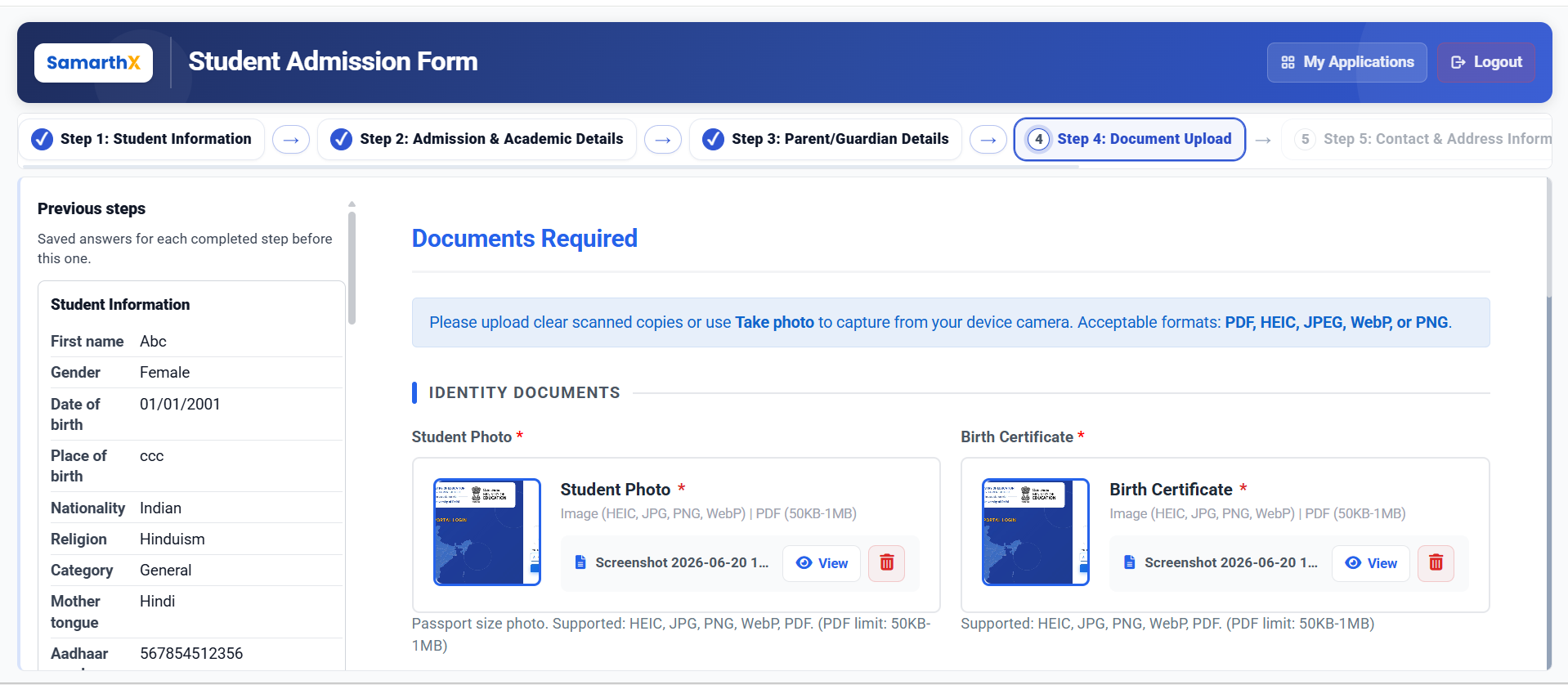
Document Upload
This step allows applicants to review previously entered information and upload the required admission documents.
Supported File Formats
The following file formats are supported:
- HEIC
- JPEG / JPG
- PNG
- WebP
General File Size Requirements
| Document Type | Allowed Size |
|---|---|
| Standard Documents | 50 KB – 1 MB |
| Additional Documents | 50 KB – 500 KB |
Note: Upload clear and legible scanned copies. Applicants may also use the Take Photo option to capture documents using their device camera.
Identity Documents
The following documents are mandatory unless otherwise specified.
| Document | Requirement |
|---|---|
| Student Photo* | Passport-size photograph of the student |
| Birth Certificate* | Student's Birth Certificate |
| Aadhaar Card* | Student's Aadhaar Card |
| Father's Aadhaar Card* | Aadhaar Card of Parent 1 |
| Mother's Aadhaar Card* | Aadhaar Card of Parent 2 |
| Guardian's Aadhaar Card* | Required if a guardian is specified |
Academic Documents
Upload academic records as applicable.
| Document | Requirement |
|---|---|
| Leaving Certificate | Previous school leaving certificate |
| Transfer/Migration Certificate | Required if transferring from another state |
| Eligibility Certificate | Required when applicable |
| Report Card / Marksheet / Progress Card | Required if previous school details are provided |
Additional Documents
Upload supporting documents, if applicable.
| Document | Requirement |
|---|---|
| Caste Certificate | Applicable for reserved categories |
| Other Document | Any additional supporting document |
Available Actions
| Action | Description |
|---|---|
| Upload | Select and upload a document from the device |
| Take Photo | Capture and upload a document using the device camera |
| View | Preview an uploaded document |
| Previous | Returns to the Parent/Guardian Details step |
| Save & Next | Saves uploaded documents and proceeds to the Contact & Address Information step |
Workflow
Parent/Guardian Details
        │
        ▼
Document Upload
        │
        ▼
Upload Identity Documents
        │
        ▼
Upload Academic Documents
        │
        ▼
Upload Additional Documents
        │
        ▼
Save & Next
        │
        ▼
Contact & Address Information
Important Notes
- Fields marked with (*) are mandatory.
- Upload clear and readable document copies.
- Ensure uploaded documents match the information entered in the application.
- Some academic and additional documents may be required only under specific admission conditions.
- Verify all uploaded files before proceeding to the next step.
- Unsupported file formats or incorrect file sizes may prevent successful upload.