
Admission Management-User Guide
Overview
The Admission Management module is used to handle student admission applications, track their status, and manage the complete admission lifecycle from submission to approval, rejection, or withdrawal.
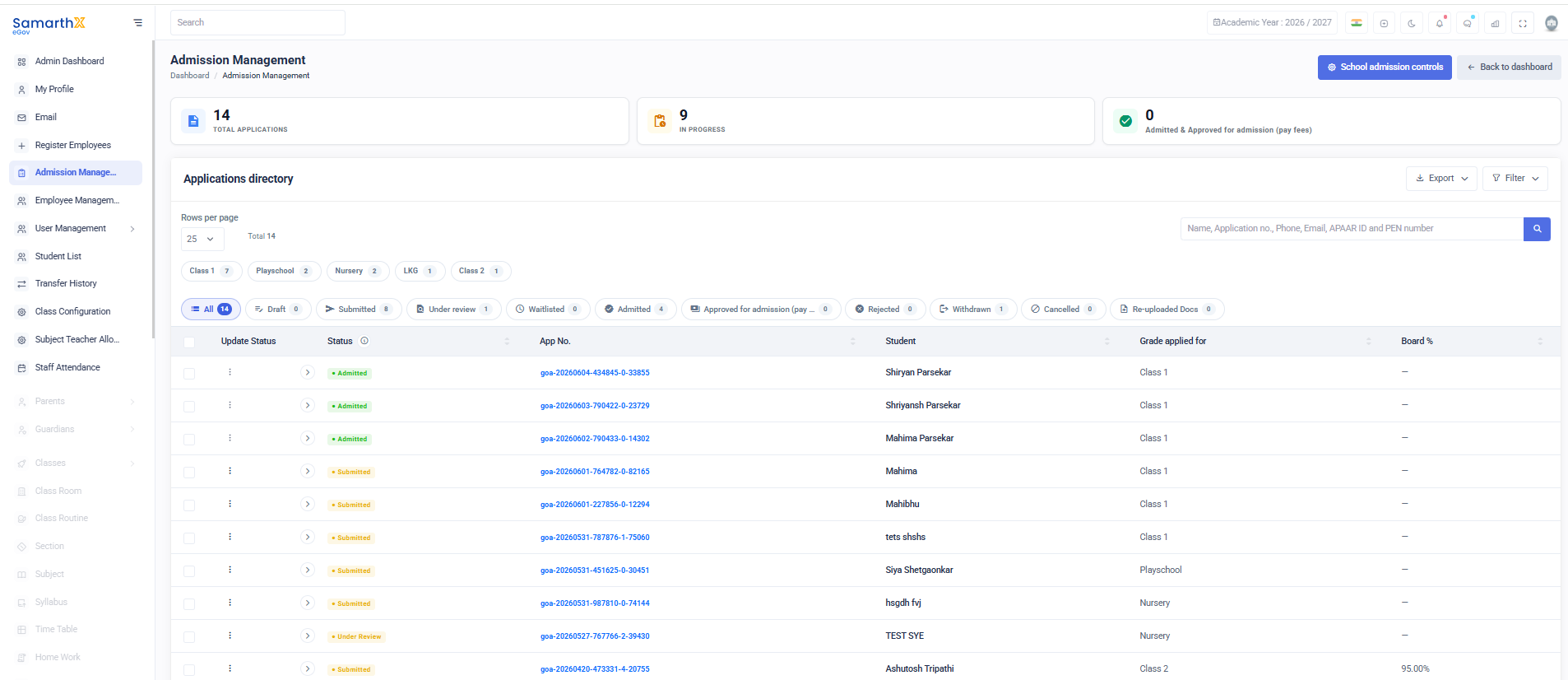
Admission Summary
- Total Applications: 14
- In Progress: 9
- Admitted: 4
- Approved for Admission (Pay Fees): 0
Class-wise Applications
- Class 1: 7
- Playschool: 2
- Nursery: 2
- LKG: 1
- Class 2: 1
Application Status Breakdown
- Draft: 0
- Submitted: 8
- Under Review: 1
- Waitlisted: 0
- Admitted: 4
- Approved (Pay Fees): 0
- Rejected: 0
- Withdrawn: 1
- Cancelled: 0
- Re-uploaded Documents: 0
Applications Directory
Displays a paginated list of all admission applications with the following details:
- Name
- Application Number
- Phone
- APAAR ID
- PEN Number
Rows per page: 25
Total Records: 14
Status Workflow
- Submitted → Application received
- Under Review → Being evaluated
- Admitted → Selected for admission
- Approved (Pay Fees) → Fee payment pending/initiated
- Rejected / Withdrawn / Cancelled → Closed applications