
Create Department Designation
Overview
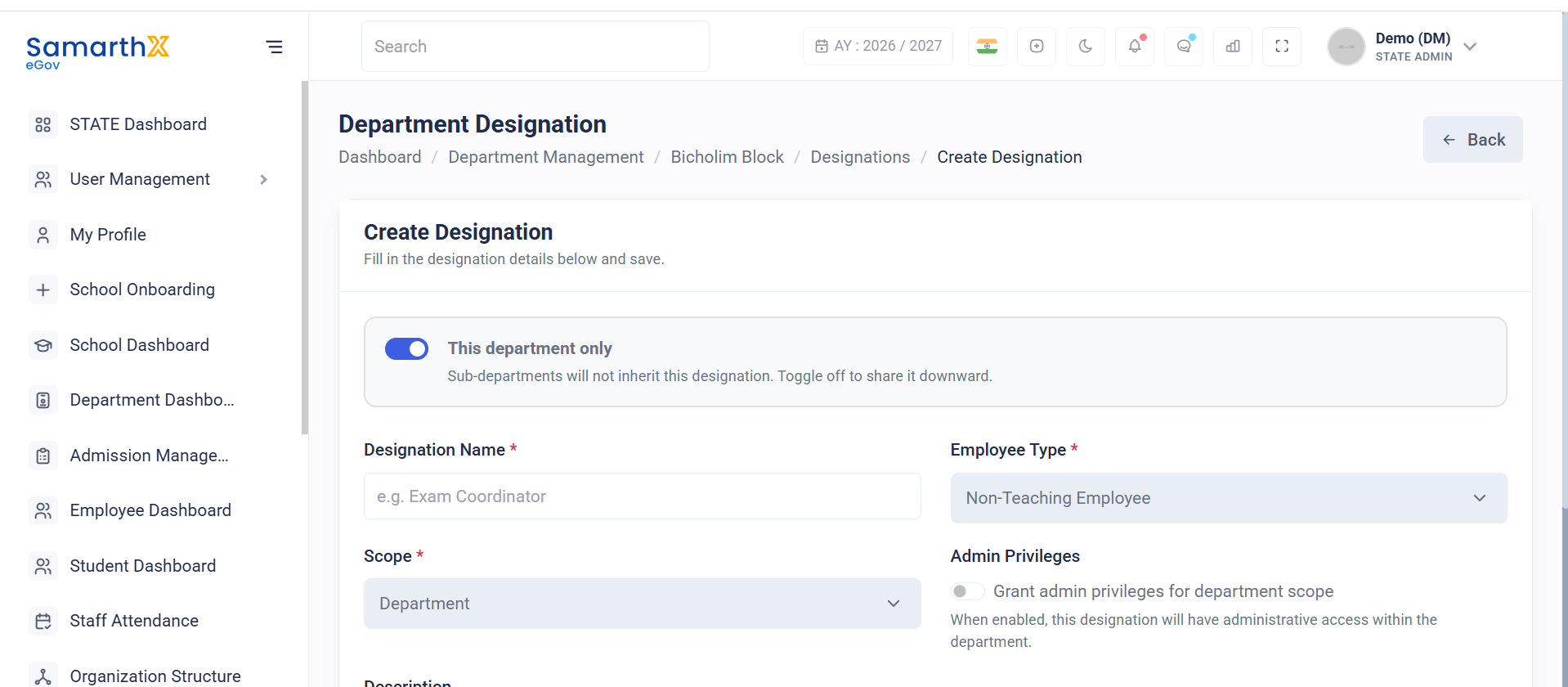
The Create Designation module allows administrators to create department-specific designations and define their scope, employee type, administrative privileges, and inheritance behavior.
This functionality helps departments establish organizational roles and assign responsibilities to employees within the department structure.
Navigation
Department Dashboard → Configure Designations for Department → Create Designation
Purpose
Administrators can use this module to:
- Create new department designations
- Define designation scope
- Assign employee categories
- Configure administrative privileges
- Control designation inheritance across sub-departments
Create Designation Form
The designation creation form captures all information required to define a new designation.
Designation Visibility
This Department Only
Determines whether the designation is available only within the selected department.
When enabled:
This department only
Sub-departments will not inherit this designation.
Shared with Sub-departments
When the toggle is disabled, the designation becomes available to child departments and can be inherited throughout the department hierarchy.
Designation Information
Designation Name
Enter the name of the designation.
Mandatory Field: Yes
Example:
Exam Coordinator
Employee Type
Select the employee category associated with the designation.
Mandatory Field: Yes
Available options may include:
- Teaching Staff
- Non-Teaching Employee
- NSQF Vocational Staff
- Administrative Staff
Example:
Non-Teaching Employee
Scope
Defines where the designation can be used.
Mandatory Field: Yes
Available options:
| Scope | Description |
|---|---|
| Department | Available within the selected department |
| Organization | Available across a broader organizational hierarchy (if configured) |
Example:
Department
Administrative Privileges
Grant Admin Privileges for Department Scope
Enable this option to provide administrative access to employees assigned this designation.
When enabled:
When enabled, this designation will have administrative access within the department.
Administrative Capabilities
Depending on system configuration, designation holders may be able to:
- Manage department records
- Access administrative dashboards
- View employee information
- Configure department settings
- Perform department-level administrative functions
Description
Provide an optional description explaining the purpose of the designation.
Examples:
- Coordinates departmental examinations and assessments.
- Manages employee records and reporting activities.
- Oversees departmental administrative operations.
Field Type: Optional
User Actions
Administrators can:
- Create department-specific designations
- Define employee type mappings
- Configure designation scope
- Enable administrative privileges
- Control designation inheritance
- Save designation configurations
Designation Workflow
Enter Designation Details
            │
            ▼
Select Employee Type
            │
            ▼
Define Scope
            │
            ▼
Configure Inheritance
            │
            ▼
Set Administrative Privileges
            │
            ▼
Save Designation
Notes
- Designation Name, Employee Type, and Scope are mandatory fields.
- Designations can be restricted to the current department or shared with sub-departments.
- Administrative privileges should be assigned only to authorized roles.
- Inherited designations become available to child departments automatically.
- Designation configurations impact employee role assignments and system access permissions.