
Student Admission Portal-Registration
Overview
The Student Admission Portal allows parents and guardians to register, create student profiles, and submit admission applications online. The portal supports applications to multiple schools and provides admission-related notifications and updates.
Navigation
Student Admission Portal → New Registration
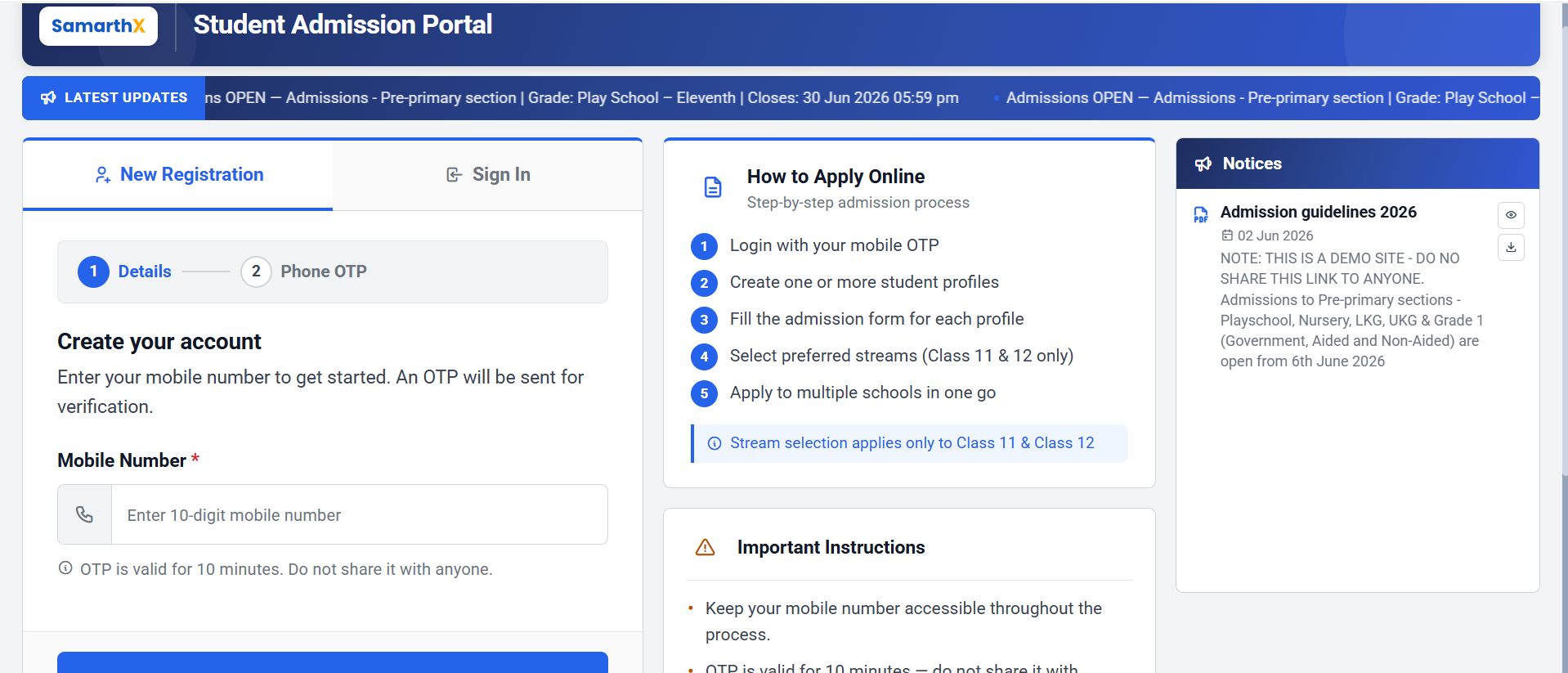
New Registration
The New Registration section allows applicants to create an account using a mobile number.
Registration Process
Step 1: Details
Enter the following information:
| Field | Description |
|---|---|
| Mobile Number* | Enter a valid 10-digit mobile number |
Note: An OTP will be sent to the registered mobile number for verification.
OTP Information
- OTP is valid for 10 minutes.
- Do not share the OTP with anyone.
- Mobile number verification is mandatory for registration.
Action
- Click Send OTP to receive the verification code.
Step 2: Phone OTP
After receiving the OTP:
- Enter the OTP received on your mobile device.
- Verify the OTP.
- Continue with account creation.
Sign In
Existing applicants can sign in using their registered mobile number and OTP.
Sign In Process
- Select Sign In.
- Enter the registered mobile number.
- Verify using OTP.
- Access the admission dashboard.
How to Apply Online
Follow the admission process below:
- Login using mobile OTP verification.
- Create one or more student profiles.
- Complete the admission form for each student.
- Select preferred streams (Class 11 and Class 12 only).
- Apply to multiple schools from a single profile.
Note: Stream selection is applicable only for Class 11 and Class 12 admissions.
Important Instructions
- Keep your mobile number accessible throughout the admission process.
- OTP is valid for 10 minutes and should not be shared.
- Keep student documents ready before starting the application.
- Ensure all information entered is accurate.
- Stream selection applies only to Class 11 and Class 12 admissions.
- Multiple school applications can be submitted from a single student profile.
Required Documents
Examples of commonly required documents:
- Aadhaar Card
- Birth Certificate
- Student Photograph
- Previous Academic Records (if applicable)
- Category Certificate (if applicable)
Admission Registration Workflow
New Applicant Registration
Open Student Admission Portal
            │
            ▼
Select "New Registration"
            │
            ▼
Enter Mobile Number
            │
            ▼
Click "Send OTP"
            │
            ▼
Receive OTP on Mobile
            │
            ▼
Verify OTP
            │
            ▼
Account Created Successfully
            │
            ▼
Create Student Profile(s)
            │
            ▼
Fill Admission Form
            │
            ▼
Upload Required Documents
            │
            ▼
Select Stream
(Class 11 & 12 Only)
            │
            ▼
Choose School(s)
            │
            ▼
Review Application
            │
            ▼
Submit Application
            │
            ▼
Application Submitted Successfully
Existing Applicant Workflow
Open Student Admission Portal
            │
            ▼
Select "Sign In"
            │
            ▼
Enter Registered Mobile Number
            │
            ▼
Receive OTP
            │
            ▼
Verify OTP
            │
            ▼
Access Admission Dashboard
            │
            ▼
View / Edit Student Profiles
            │
            ▼
Complete Pending Applications
            │
            ▼
Track Admission Status
Admission Process Flow
Registration
      │
      ▼
Mobile Verification
      │
      ▼
Student Profile Creation
      │
      ▼
Admission Form Submission
      │
      ▼
Document Upload
      │
      ▼
School Selection
      │
      ▼
Application Submission
      │
      ▼
Application Review
      │
      ▼
Admission Decision
      │
      ├── Admitted
      ├── Waitlisted
      └── Rejected
Important Notes
- OTP remains valid for 10 minutes.
- Multiple student profiles can be created under one account.
- Applications can be submitted to multiple schools.
- Stream selection is available only for Class 11 and Class 12 admissions.
- Applicants should keep all required documents ready before starting the application process.
Notices
The Notices section displays important admission-related announcements and guidelines.
Features
- Admission notifications
- Admission guidelines
- Important announcements
- Downloadable documents
- Notice viewing options
Example Notice
Admission Guidelines 2026
Contains information related to:
- Admission schedule
- Eligible classes
- Application timelines
- School admission instructions
- Important admission rules
Support Information
For admission-related assistance, applicants may contact the helpdesk.
Helpdesk
| Contact Type | Details |
|---|---|
| Helpline | 0832-2415585 / 2410824 |
| info.samarthx.goa@gmail.com | |
| Working Hours | Monday to Saturday, 9:30 AM – 6:00 PM |
Important Notes
- Admissions are accepted only during the active admission period.
- Applicants should regularly check the Notices section for updates.
- Incomplete applications may not be considered for admission.
- Keep all supporting documents ready before beginning the application process.