
Student Admission Portal – Registration & Login
Overview
The Student Admission Portal allows parents and guardians to register, create student profiles, and submit admission applications online. The portal supports applications to multiple schools and provides admission-related notifications and updates.
Navigation
Student Admission Portal → New Registration
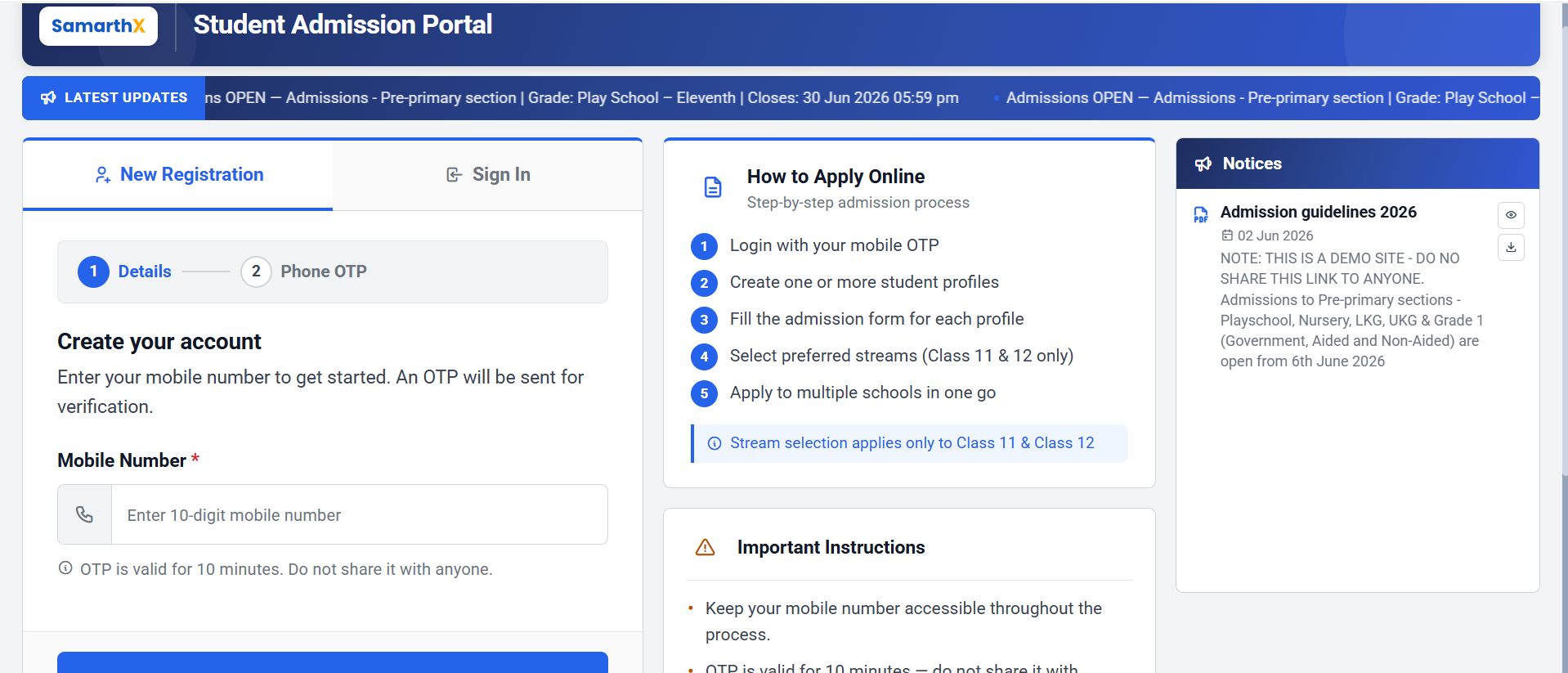
New Registration
The New Registration section allows applicants to create an account using a mobile number.
Registration Process
Step 1: Details
| Field | Description |
|---|---|
| Mobile Number* | Enter a valid 10-digit mobile number |
Note: An OTP will be sent to the registered mobile number for verification.
OTP Information
- OTP is valid for 10 minutes.
- Do not share the OTP with anyone.
- Mobile number verification is mandatory for registration.
Action
- Click Send OTP to receive the verification code.
Step 2: Phone OTP
After receiving the OTP:
- Enter the OTP received on your mobile device.
- Verify the OTP.
- Continue with account creation.
Sign In
Existing applicants can sign in using their registered mobile number and OTP.
Sign In Process
- Select Sign In.
- Enter the registered mobile number.
- Verify using OTP.
- Access the admission dashboard.
No comments to display
No comments to display