
# Student Admission Portal – Registration & Login
Overview
The Student Admission Portal allows parents and guardians to register, create student profiles, and submit admission applications online. The portal supports applications to multiple schools and provides admission-related notifications and updates.
Navigation
Student Admission Portal → New Registration
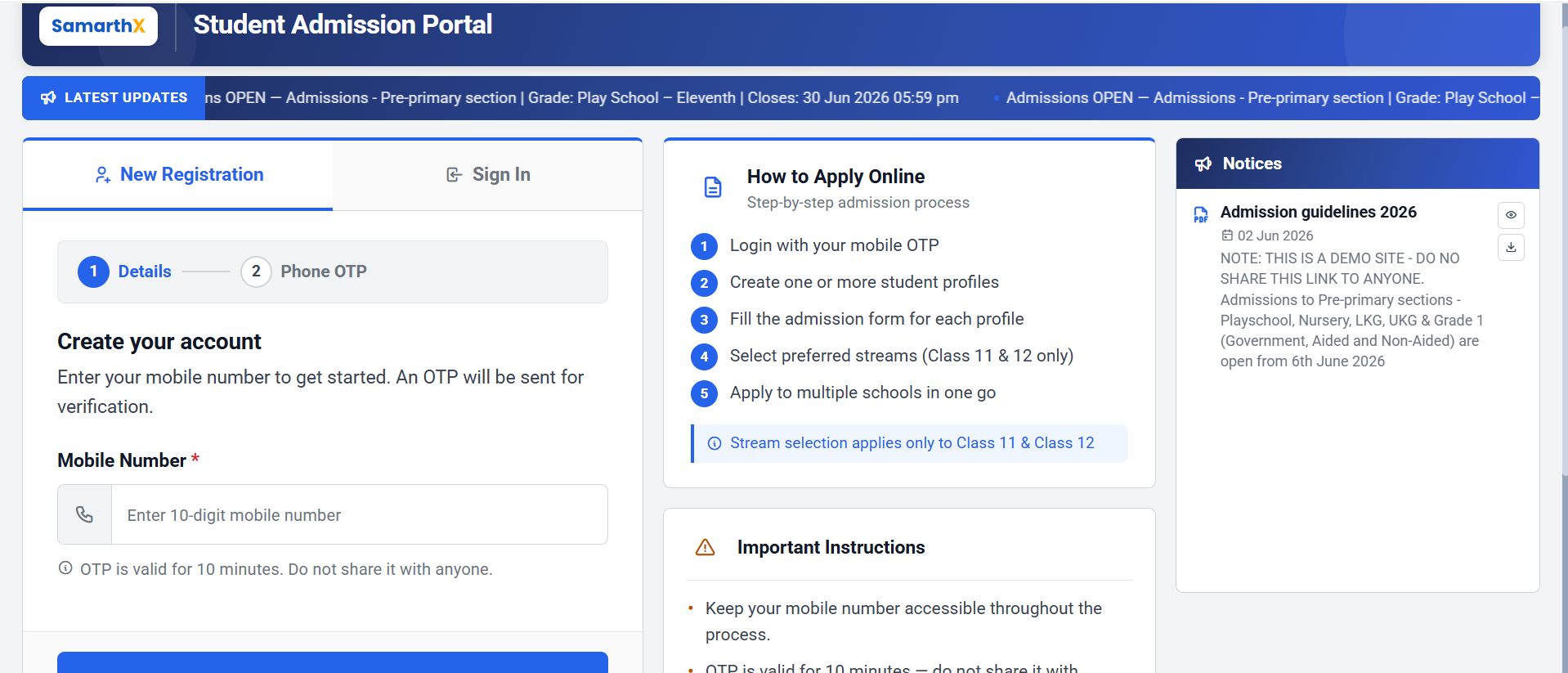
New Registration
The New Registration section allows applicants to create an account using a mobile number.
Registration Process
Step 1: Details
Enter the following information:
| Field | Description |
|---|---|
| Mobile Number* | Enter a valid 10-digit mobile number |
Note: An OTP will be sent to the registered mobile number for verification.
OTP Information
- OTP is valid for 10 minutes.
- Do not share the OTP with anyone.
- Mobile number verification is mandatory for registration.
Action
- Click Send OTP to receive the verification code.
Step 2: Phone OTP
After receiving the OTP:
- Enter the OTP received on your mobile device.
- Verify the OTP.
- Continue with account creation.
Sign In
Existing applicants can sign in using their registered mobile number and OTP.
Sign In Process
- Select Sign In.
- Enter the registered mobile number.
- Verify using OTP.
- Access the admission dashboard.
How to Apply Online
Follow the admission process below:
Login using mobile OTP verification.Create one or more student profiles.Complete the admission form for each student.Select preferred streams (Class 11 and Class 12 only).Apply to multiple schools from a single profile.
Note:Stream selection is applicable only for Class 11 and Class 12 admissions.
Important Instructions
Keep your mobile number accessible throughout the admission process.OTP is valid for 10 minutes and should not be shared.Keep student documents ready before starting the application.Ensure all information entered is accurate.Stream selection applies only to Class 11 and Class 12 admissions.Multiple school applications can be submitted from a single student profile.
Required Documents
Examples of commonly required documents:
Aadhaar CardBirth CertificateStudent PhotographPrevious Academic Records (if applicable)Category Certificate (if applicable)
Admission Registration Workflow
New Applicant Registration
Open Student Admission Portal
            │
            ▼
Select "New Registration"
            │
            ▼
Enter Mobile Number
            │
            ▼
Click "Send OTP"
            │
            ▼
Receive OTP on Mobile
            │
            ▼
Verify OTP
            │
            ▼
Account Created Successfully
            │
            ▼
Create Student Profile(s)
            │
            ▼
Fill Admission Form
            │
            ▼
Upload Required Documents
            │
            ▼
Select Stream
(Class 11 & 12 Only)
            │
            ▼
Choose School(s)
            │
            ▼
Review Application
            │
            ▼
Submit Application
            │
            ▼
Application Submitted Successfully
Existing Applicant Workflow
Open Student Admission Portal
            │
            ▼
Select "Sign In"
            │
            ▼
Enter Registered Mobile Number
            │
            ▼
Receive OTP
            │
            ▼
Verify OTP
            │
            ▼
Access Admission Dashboard
            │
            ▼
View / Edit Student Profiles
            │
            ▼
Complete Pending Applications
            │
            ▼
Track Admission Status
Admission Process Flow
Registration
      │
      ▼
Mobile Verification
      │
      ▼
Student Profile Creation
      │
      ▼
Admission Form Submission
      │
      ▼
Document Upload
      │
      ▼
School Selection
      │
      ▼
Application Submission
      │
      ▼
Application Review
      │
      ▼
Admission Decision
      │
      ├── Admitted
      ├── Waitlisted
      └── Rejected
Important Notes
OTP remains valid for 10 minutes.Multiple student profiles can be created under one account.Applications can be submitted to multiple schools.Stream selection is available only for Class 11 and Class 12 admissions.Applicants should keep all required documents ready before starting the application process.
Important Notes
OTP remains valid for 10 minutes.Multiple student profiles can be created under one account.Applications can be submitted to multiple schools.Stream selection is available only for Class 11 and Class 12 admissions.Applicants should keep all required documents ready before starting the application process.
Notices
The Notices section displays important admission-related announcements and guidelines.
Features
Admission notificationsAdmission guidelinesImportant announcementsDownloadable documentsNotice viewing options
Example Notice
Admission Guidelines 2026
Contains information related to:
Admission scheduleEligible classesApplication timelinesSchool admission instructionsImportant admission rules
Support Information
For admission-related assistance, applicants may contact the helpdesk.
Helpdesk
Important Notes
Admissions are accepted only during the active admission period.Applicants should regularly check the Notices section for updates.Incomplete applications may not be considered for admission.Keep all supporting documents ready before beginning the application process.