
User Management-User Guide-School Designations & Permissions
Overview
The Designations & Permissions module enables administrators to manage organizational designations and define role-based access across the system. It helps standardize employee roles, appointment types, and permission structures for teaching and non-teaching staff.
Navigation
Dashboard → Designations & Permissions → Designations List
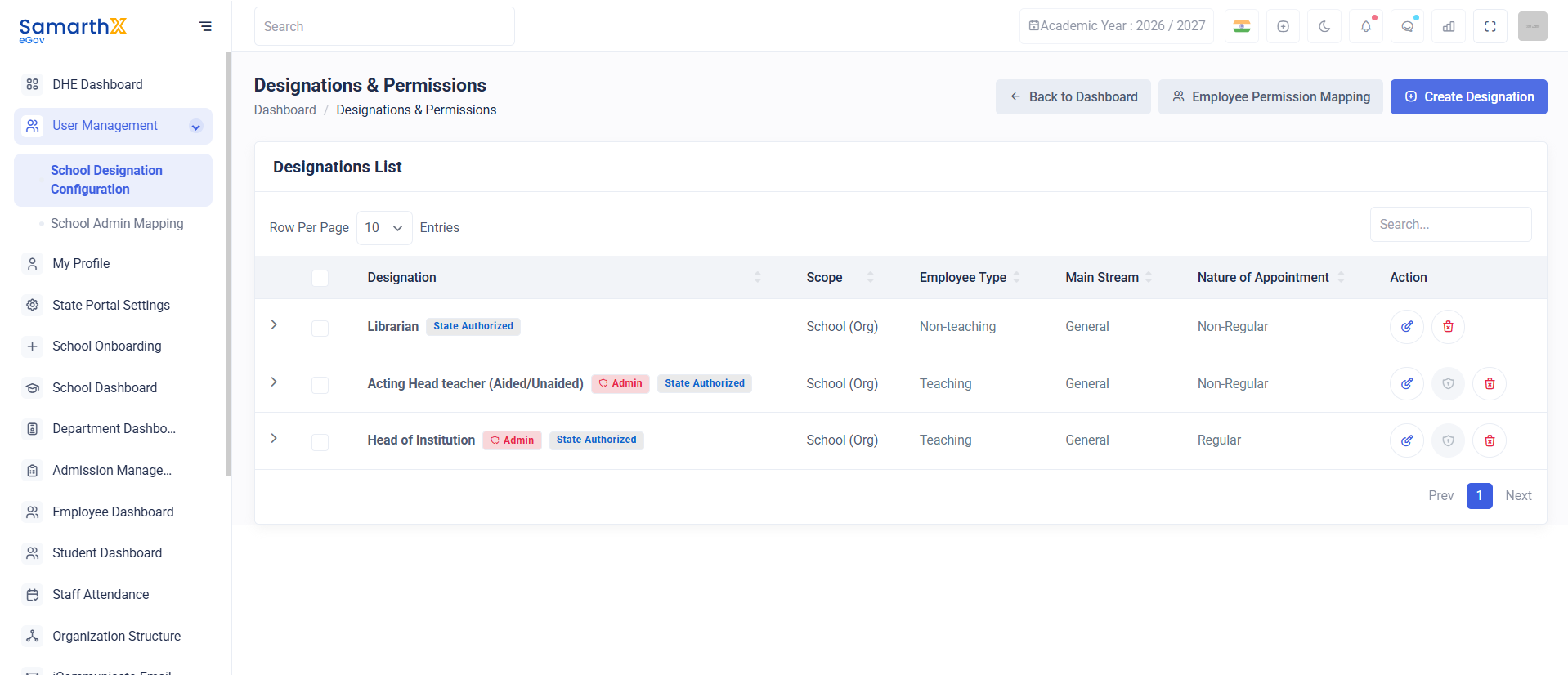
Designations List
The Designations List page displays all configured employee designations available within the organization.
Features
- View designation records
- Search designations
- Review employee classifications
- Manage designation configurations
- Configure role-based permissions
Search Designations
Administrators can search designation records using the search box available at the top of the page.
Search Parameters
- Designation Name
- Employee Type
- Main Stream
- Nature of Appointment
- Scope
Designation Information
The designation table displays the following details:
| Field | Description |
|---|---|
| Designation | Official designation name |
| Scope | Administrative scope of the designation |
| Employee Type | Teaching or Non-Teaching category |
| Main Stream | Employee stream classification |
| Nature of Appointment | Employment type classification |
| Action | Available management actions |
Employee Types
Teaching Staff
Designations associated with instructional and academic responsibilities.
Examples:
- Head of Institution
- Acting Head Teacher
- Teacher
- Lecturer
Non-Teaching Staff
Designations associated with administrative and operational responsibilities.
Examples:
- Librarian
- Administrative Staff
- Office Assistant
- Clerk
Main Stream Classification
The Main Stream field categorizes employees based on organizational classification.
Available Categories
- General
- Specialized Streams (if configured)
- Administrative Streams (if configured)
Nature of Appointment
Defines the employment category associated with the designation.
Available Types
| Type | Description |
|---|---|
| Regular | Permanent appointment |
| Non-Regular | Temporary, contractual, or acting appointment |
User Actions
View Designation Details
Search a Designation
- Enter keywords in the search field.
- Review filtered results.
Manage Permissions
- Select the required designation.
- Open the available actions.
- Configure permissions and access rights.
Security and Access Control
Purpose
The Designations & Permissions module provides centralized management of employee roles, organizational designations, and permission structures, ensuring consistent access control and role governance across the system.