
User Management-User Guide-School Designations & Permissions
Overview
The Designations & Permissions module enables administrators to manage organizational designations and define role-based access across the system. It helps standardize employee roles, appointment types, and permission structures for teaching and non-teaching staff.
Navigation
Dashboard → Designations & Permissions → Designations List
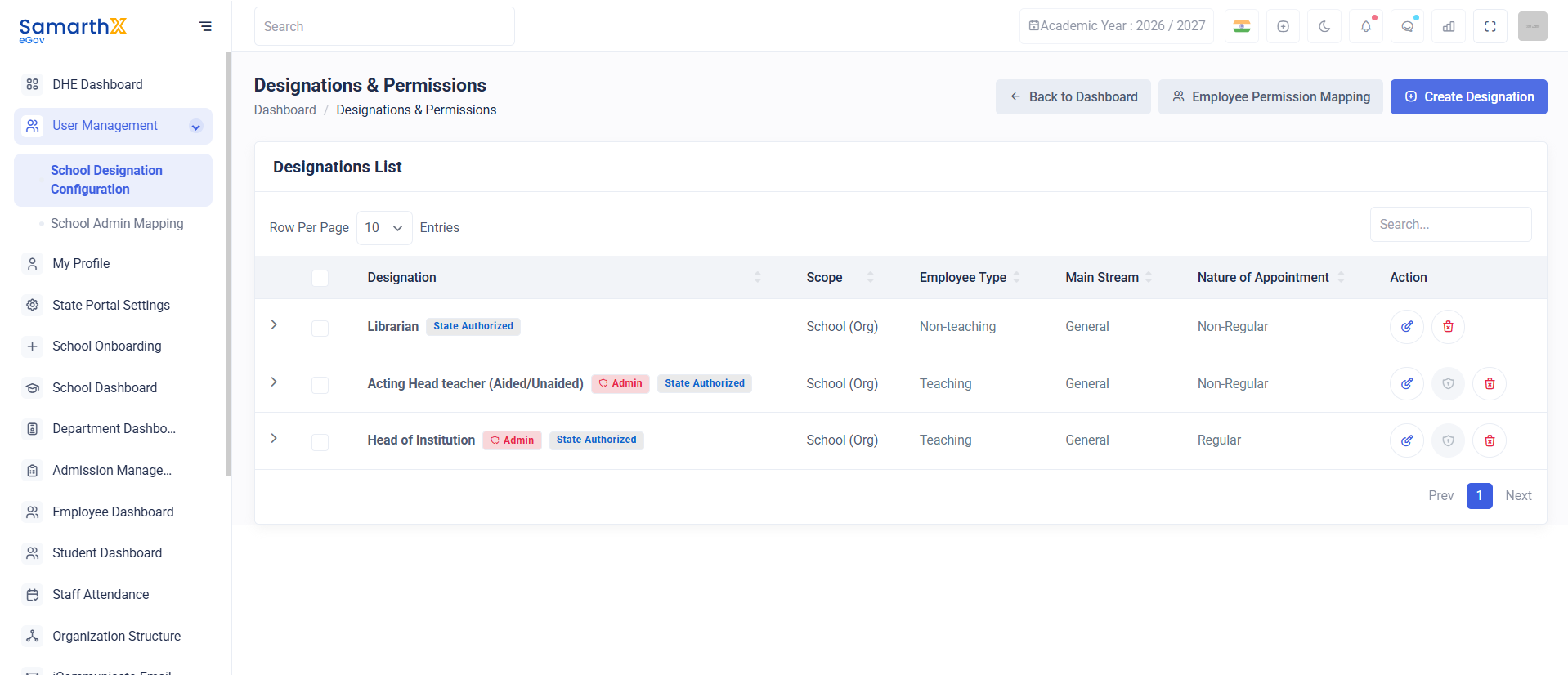
Designations List
The Designations List page displays all configured employee designations available within the organization.
Features
- View designation records
- Search designations
- Review employee classifications
- Manage designation configurations
- Configure role-based permissions
Search Designations
Administrators can search designation records using the search box available at the top of the page.
Search Parameters
- Designation Name
- Employee Type
- Main Stream
- Nature of Appointment
- Scope
Designation Information
The designation table displays the following details:
| Field | Description |
|---|---|
| Designation | Official designation name |
| Scope | Administrative scope of the designation |
| Employee Type | Teaching or Non-Teaching category |
| Main Stream | Employee stream classification |
| Nature of Appointment | Employment type classification |
| Action | Available management actions |
Employee Types
Teaching Staff
Designations associated with instructional and academic responsibilities.
Examples:
- Head of Institution
- Acting Head Teacher
- Teacher
- Lecturer
Non-Teaching Staff
Designations associated with administrative and operational responsibilities.
Examples:
- Librarian
- Administrative Staff
- Office Assistant
- Clerk
Vocational Staff
Designations associated with vocational education, skill development programs, and industry-oriented training activities.
Examples:
- Vocational Instructor
- Skill Trainer
- Vocational Coordinator
- Trade Instructor
Note: Vocational Staff designations can only be created, managed, and assigned by the Directorate of Higher Education (DHE). These designations are not available for configuration or modification by schools or other users.
Main Stream Classification
The Main Stream field categorizes employees based on organizational classification.
Available Categories
- General
- Specialized Streams (if configured)
- Administrative Streams (if configured)
Nature of Appointment
Defines the employment category associated with the designation.
Available Types
| Type | Description |
|---|---|
| Regular | Permanent appointment |
| Non-Regular | Temporary, contractual, or acting appointment |
User Actions
View Designation Details
Search a Designation
- Enter keywords in the search field.
- Review filtered results.
Manage Permissions
- Select the required designation.
- Open the available actions.
- Configure permissions and access rights.
Security and Access Control
Purpose
The Designations & Permissions module provides centralized management of employee roles, organizational designations, and permission structures, ensuring consistent access control and role governance across the system.
No comments to display
No comments to display