
Step 2: Student Admission Form – Admission & Academic Details
Overview
The Admission & Academic Details section captures the student's previous academic information and admission-related details required for the application process.
Navigation
Student Admission Portal → My Applications → Student Admission Form → Step 2: Admission & Academic Details
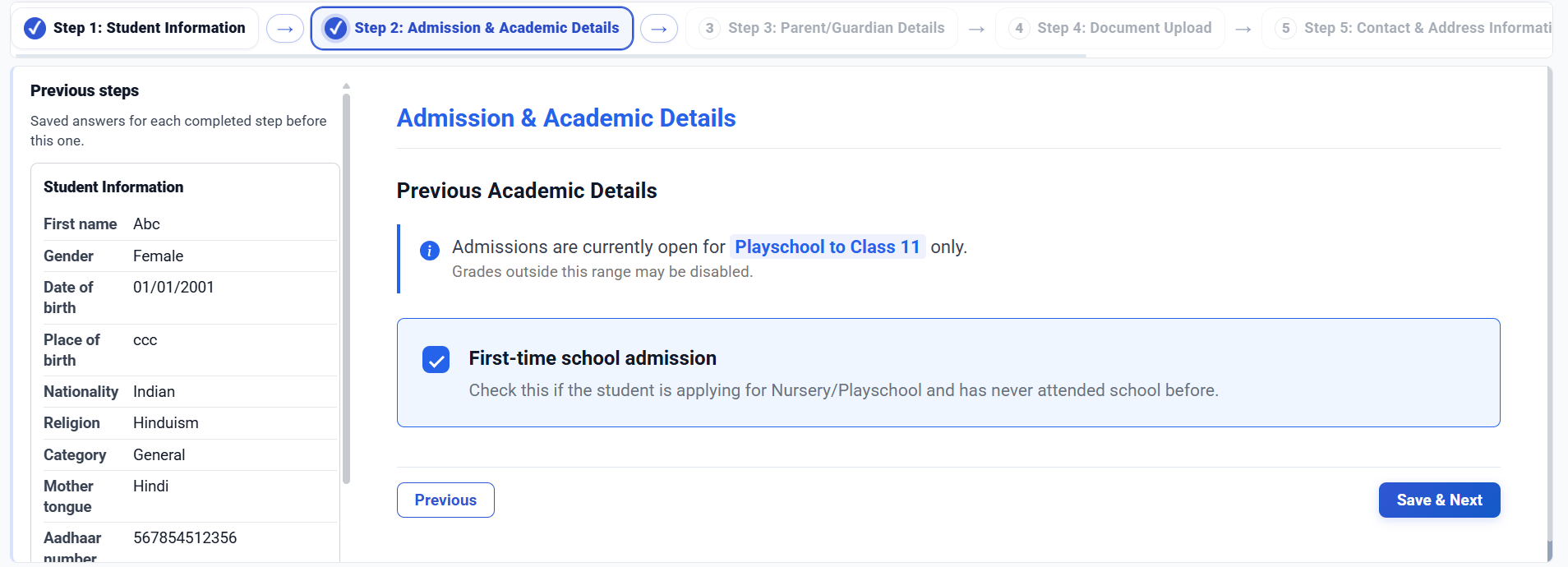
Admission & Academic Details
This step allows applicants to review previously entered student information and provide academic details required for admission.
Student Information Summary
The following details entered in Step 1 are displayed for reference:
| Field | Description |
|---|---|
| First Name | Student's first name |
| Gender | Student's gender |
| Date of Birth | Student's date of birth |
| Place of Birth | Student's place of birth |
| Nationality | Student's nationality |
| Religion | Student's religion |
| Category | Student's category |
| Mother Tongue | Student's mother tongue |
| Aadhaar Number | Student's Aadhaar number |
| Person with Disability | Disability status |
Previous Academic Details
Applicants can provide details of the student's previous educational background, where applicable.
Note: Admissions are currently open for Playschool to Class 11 only. Classes outside this range may not be available for selection.
Available Actions
| Action | Description |
|---|---|
| Previous | Returns to the Student Information step |
| Save & Next | Saves the entered information and proceeds to the Parent/Guardian Details step |
Workflow
Student Information
        │
        ▼
Admission & Academic Details
        │
        ▼
Previous Academic Details
        │
        ▼
Save & Next
        │
        ▼
Parent/Guardian Details
Important Notes
- Review the student information summary before proceeding.
- Ensure all academic information is accurate and up to date.
- Admission availability depends on the classes currently open for admission.
- Saved information can be reviewed and updated before final submission.
No comments to display
No comments to display