
Designation Permission Mapping
Overview
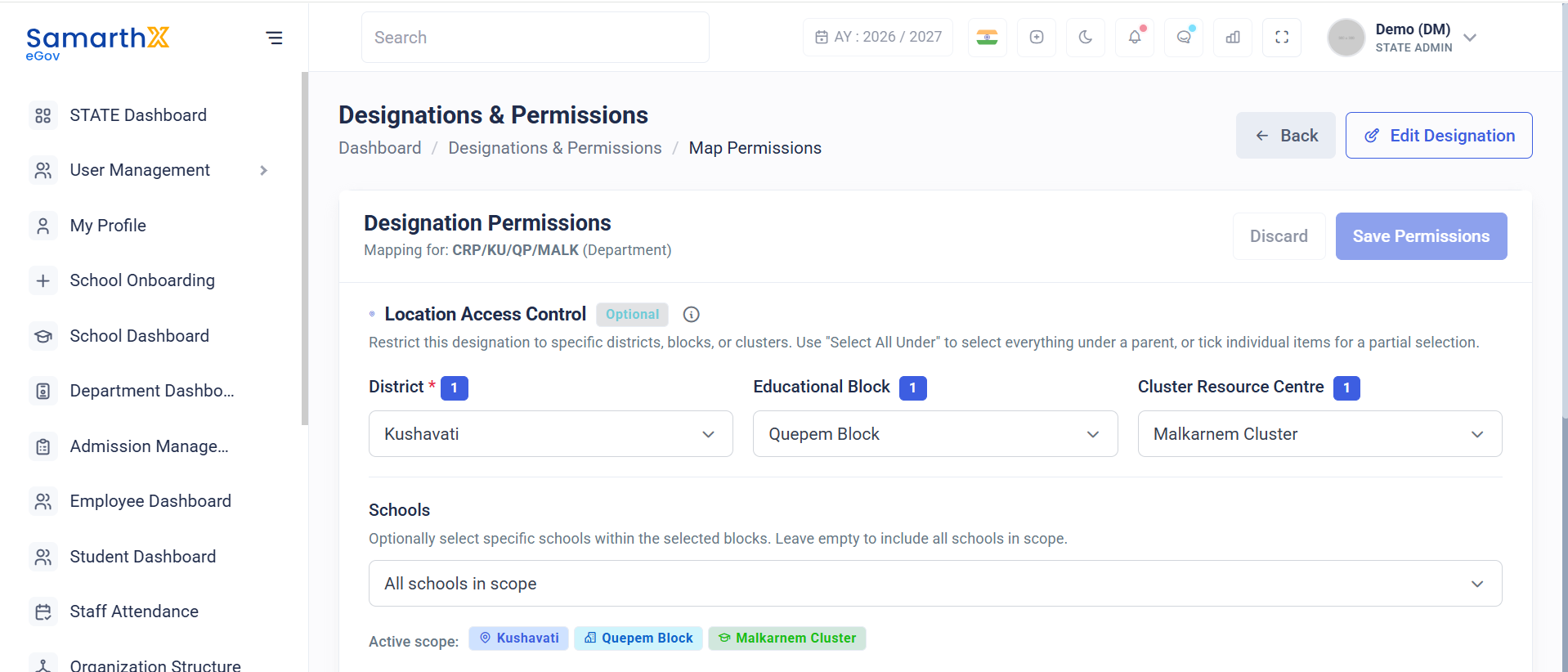
The Designation Permission Mapping module allows administrators to assign system permissions and define location-based access controls for a specific designation. Permissions determine which modules and functions can be accessed by employees assigned to the designation.
Navigation
Department Dashboard → Designations & Permissions → Map Permissions
Purpose
This module enables administrators to:
- Assign permissions to designations
- Configure location-based access restrictions
- Define operational scope for designation holders
- Control access to organizational modules
- Implement role-based access management
Designation Information
The page displays the designation currently being configured.
Example
Mapping for: CRP/KU/QP/MALK (Department)
The configured permissions apply to all employees assigned to this designation.
Location Access Control
Overview
Location Access Control restricts designation access to specific organizational locations.
This feature is optional and can be used to limit access to:
- Districts
- Educational Blocks
- Clusters
- Schools
Location Hierarchy Selection
Administrators can define access using the organizational hierarchy.
District
Select one or more districts.
Example:
Kushavati
Educational Block
Select blocks available under the selected district.
Example:
Quepem Block
Cluster Resource Centre
Select clusters available within the selected block.
Example:
Malkarnem Cluster
Bulk Selection
Administrators can use:
Select All Under
Automatically selects all child locations under a parent node.
Example:
District
   └── All Blocks
         └── All Clusters
               └── All Schools
School Selection
Schools
Optionally select specific schools within the chosen location hierarchy.
If no schools are selected:
All schools in scope
The designation will have access to all schools within the selected district, block, or cluster.
Active Scope
The system displays the currently selected access scope.
Example
Kushavati
Quepem Block
Malkarnem Cluster
This summary helps administrators verify the configured access area before saving.
Permissions
Overview
At least one permission must be assigned before the designation can be saved.
Required — enable at least one permission to save
Permission Categories
The system groups permissions by functional area.
Attendance Access
Controls access to attendance-related functions.
Example:
1 assigned · 1 permissions
Typical permissions may include:
- View Attendance
- Mark Attendance
- Manage Attendance Records
Employee Access
Controls access to employee management functions.
Example:
1 assigned · 1 permissions
Typical permissions may include:
- View Employees
- Manage Employees
- Update Employee Information
School Access
Controls access to school-related information.
Example:
1 assigned · 1 permissions
Typical permissions may include:
- View School Information
- Access School Dashboards
- Review School Records
Student Access
Controls access to student-related information.
Example:
1 assigned · 1 permissions
Typical permissions may include:
- View Student Records
- Access Student Profiles
- Manage Student Information
User Actions
Administrators can:
- Configure designation permissions
- Restrict access by location
- Select districts, blocks, and clusters
- Define school-level access
- Assign module permissions
- Review active access scope
- Save permission mappings
Permission Mapping Workflow
Select Designation
            │
            ▼
Configure Location Scope
            │
            ▼
Select Schools (Optional)
            │
            ▼
Assign Permissions
            │
            ▼
Review Active Scope
            │
            ▼
Save Mapping
Notes
- At least one permission must be enabled before saving.
- Location restrictions determine where the designation holder can perform authorized actions.
- If no schools are selected, access applies to all schools within the selected scope.
- Permissions are inherited by employees assigned to the designation.
- Access is controlled through role-based permission management.
- Changes take effect after the permission mapping is saved.
No comments to display
No comments to display