
iCommunicate – User Guide
Overview
The iCommunicate module provides a centralized platform for managing internal communications. Users can compose, receive, search, and manage messages exchanged within the system.
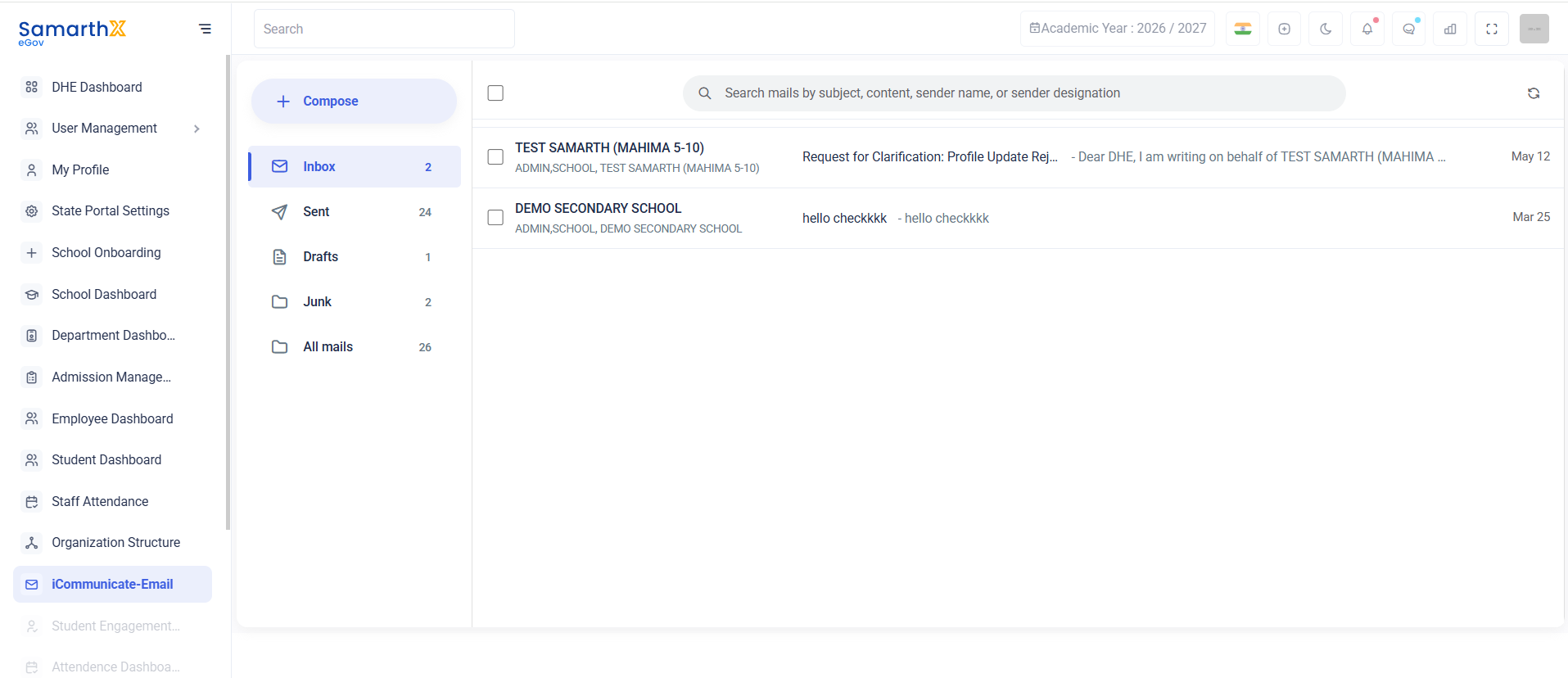
Navigation
Dashboard → iCommunicate → Inbox
Purpose
The Inbox module enables users to:
- Receive messages from other users and institutions
- View communication history
- Manage drafts and sent messages
- Search messages efficiently
- Track important communications
Mail Folders
| Folder | Description |
|---|---|
| Compose | Create and send a new message |
| Inbox | View received messages |
| Sent | View sent messages |
| Drafts | View saved draft messages |
| Junk | View spam or unwanted messages |
| All Mails | View all available messages |
Search Messages
The search bar allows users to locate messages quickly.
Search Criteria
- Subject
- Message Content
- Sender Name
- Sender Designation
Example
Search mails by subject, content, sender name, or sender designation
Inbox Messages
The Inbox displays received communications along with sender details and message previews.
Available Information
| Field | Description |
|---|---|
| Sender Name | Name of the sender |
| Sender Role | Designation or role of the sender |
| Subject | Message subject |
| Preview | Short message preview |
| Date | Message received date |
Example Messages
Request for Clarification
| Field | Value |
|---|---|
| Sender | TEST SAMARTH (MAHIMA 5-10) |
| Role | ADMIN, SCHOOL |
| Subject | Request for Clarification: Profile Update Rejection |
| Date | May 12 |
General Communication
| Field | Value |
|---|---|
| Sender | DEMO SECONDARY SCHOOL |
| Role | ADMIN, SCHOOL |
| Subject | hello checkkkk |
| Date | Mar 25 |
User Actions
Compose a Message
- Click Compose.
- Select recipient(s).
- Enter subject.
- Write the message.
- Click Send.
Read a Message
- Open Inbox.
- Select the desired message.
- Review the complete message content.
Search Messages
- Enter keywords in the search bar.
- Review matching results.
View Sent Messages
- Click Sent.
- Review previously sent communications.
Communication Workflow
Compose Message
       ↓
Send Message
       ↓
Recipient Inbox
       ↓
Read Message
       ↓
Reply / Archive
Purpose
The iCommunicate serves as the primary communication hub for schools, administrators, and departments, enabling secure and efficient information exchange within the platform.
No comments to display
No comments to display