
Leave Managment- User Guide
Apply Leave
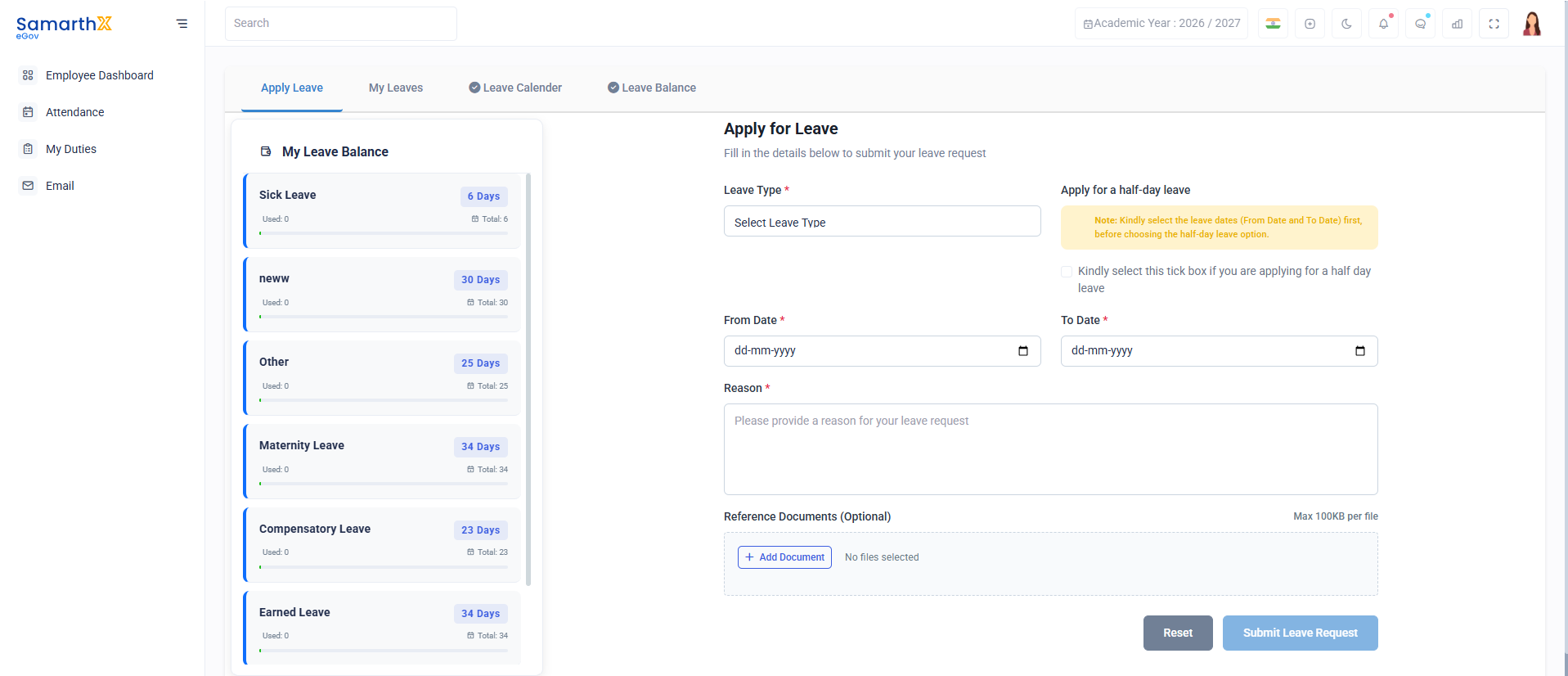
Overview
The Apply Leave module allows employees to view leave balances and submit leave requests.
Leave Balance
| Leave Type | Available | Used | Total |
|---|---|---|---|
| Sick Leave | 6 Days | 0 | 6 |
| Neww | 30 Days | 0 | 30 |
| Other | 25 Days | 0 | 25 |
| Maternity Leave | 34 Days | 0 | 34 |
| Compensatory Leave | 23 Days | 0 | 23 |
| Earned Leave | 34 Days | 0 | 34 |
| Compensatory Leave | 12 Days | 0 | 12 |
Apply for Leave
Fill in the required details to submit a leave request.
Leave Details
| Field | Description |
|---|---|
| Leave Type* | Select leave category |
| From Date* | Leave start date |
| To Date* | Leave end date |
| Reason* | Reason for leave request |
Half-Day Leave
Select the From Date and To Date first before choosing the half-day leave option.
- Apply for a half-day leave (Checkbox)
Supporting Documents
| Field | Requirement |
|---|---|
| Reference Documents | Optional |
| File Size | Max 100 KB per file |
Available Tabs
- Apply Leave
- My Leaves
- Leave Calendar
- Leave Balance
Key Features
- View leave balances
- Apply for full-day or half-day leave
- Upload supporting documents
- Track leave requests
- Access leave calendar
- View leave history
No comments to display
No comments to display