
User Management-School Admin Mapping
Overview
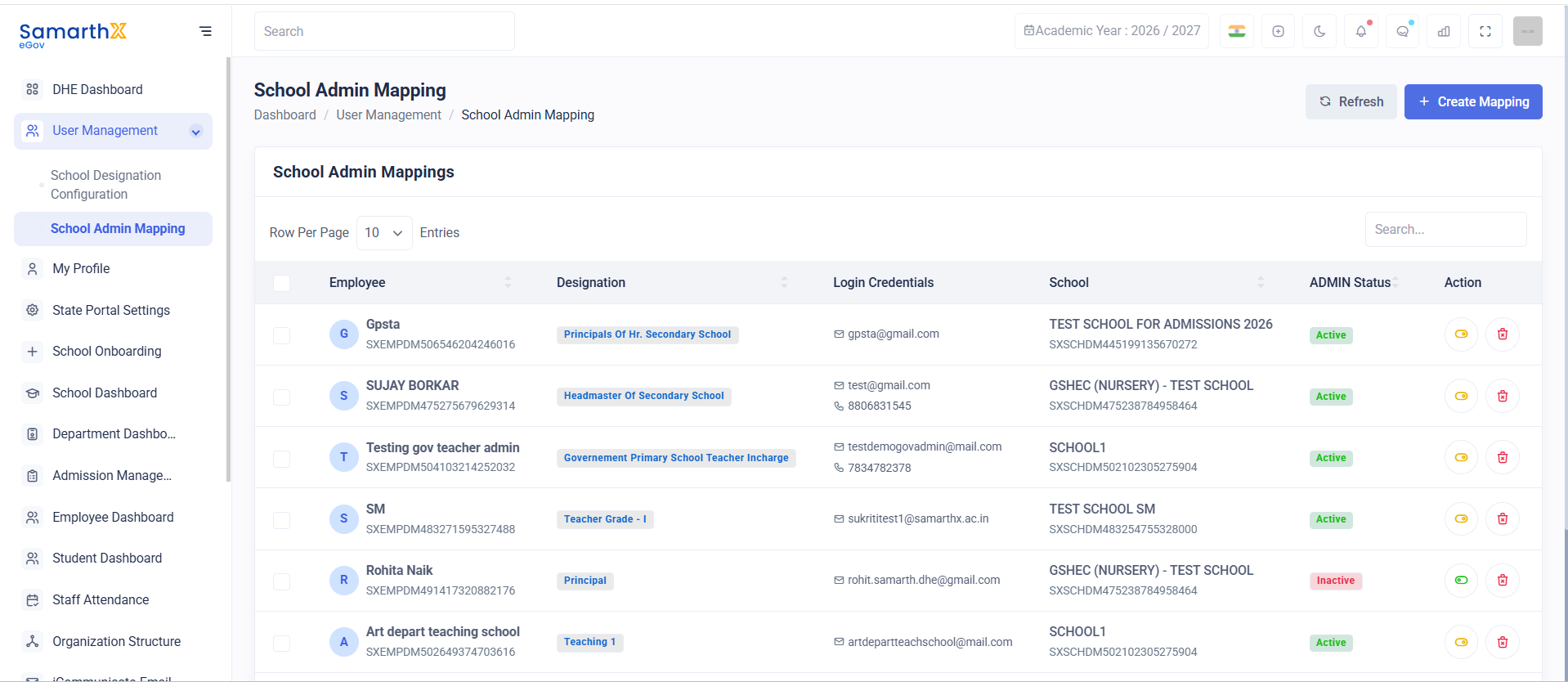
The School Admin Mapping module allows administrators to assign employees as school administrators and manage administrative access for individual schools. It provides centralized control over school-level administration and user access management.
Navigation
Dashboard → User Management → School Admin Mapping
Purpose
The School Admin Mapping module enables administrators to:
- Assign school administrators
- Manage school-level access
- View mapped administrators
- Activate or deactivate admin assignments
- Monitor administrative ownership of schools
School Admin Mappings
The School Admin Mappings page displays all employee-to-school administrative assignments.
Features
- Search mapped administrators
- View employee details
- Review assigned schools
- Monitor admin status
- Manage administrative mappings
Search School Admin Mappings
Administrators can search records using:
- Employee Name
- Employee ID
- Designation
- Email Address
- School Name
- School Code
Mapping Information
The mapping table displays the following information:
| Field | Description |
|---|---|
| Employee | Employee assigned as school administrator |
| Designation | Employee designation |
| Login Credentials | Employee login identifier |
| School | Assigned school |
| School Code | Unique school identifier |
| Admin Status | Current administrative status |
| Action | Available management actions |
Administrative Status
The ADMIN Status field indicates whether an employee currently has active school administrative privileges.
Available Statuses
| Status | Description |
|---|---|
| Active | Employee has active administrative access to the school |
| Inactive | Administrative access is currently disabled |
School Administrator Responsibilities
Mapped school administrators may be granted access to:
- School Dashboard
- Student Management
- Employee Management
- Attendance Management
- Admissions Management
- Leave Management
- School Reports
- Communication Modules
Access depends on assigned permissions and organizational policies.
User Actions
View School Admin Mapping
Activate School Administrator
- Locate the employee record.
- Select the available action.
- Change the status to Active.
- Save the changes.
Deactivate School Administrator
- Locate the employee record.
- Select the available action.
- Change the status to Inactive.
- Save the changes.
Review Assigned School
- Select the mapped administrator.
- Review school information and assignment details.
- Verify administrative responsibilities.
School Admin Mapping Workflow
Select Employee
        ↓
Assign School
        ↓
Grant Administrative Access
        ↓
Activate Mapping
        ↓
School Administration Enabled
Purpose
The School Admin Mapping module provides centralized control over school-level administration by linking authorized employees with schools and managing administrative access across the organization.
No comments to display
No comments to display