
Leave Management-Dashboard- Settings
Page2: Leave Calendar Settings
The Leave Calendar Settings section allows administrators to configure weekends, working hours, and organizational holidays.
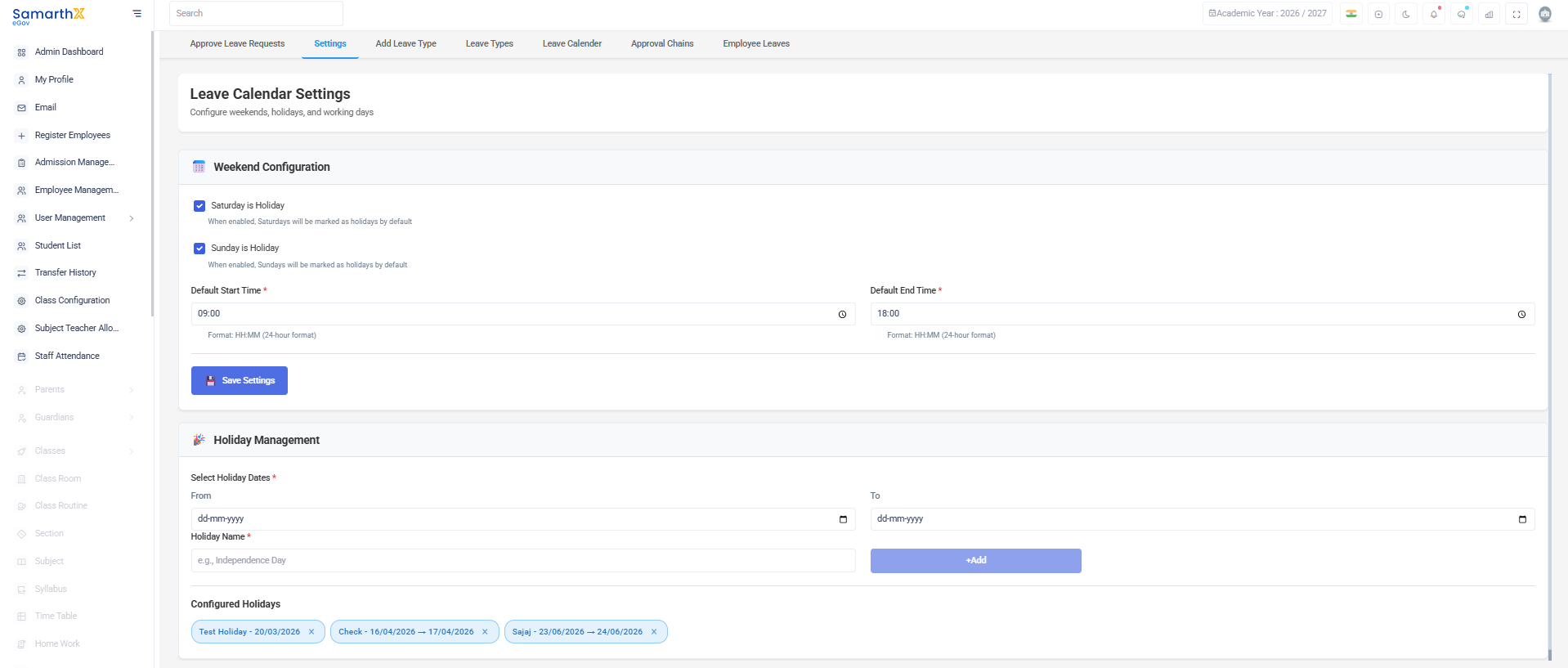
Weekend Configuration
Configure default weekly holidays:
- Saturday is Holiday – Marks Saturdays as holidays.
- Sunday is Holiday – Marks Sundays as holidays.
Working Hours
Set the default working hours for employees:
- Default Start Time – Start of the working day (24-hour format).
- Default End Time – End of the working day (24-hour format).
Holiday Management
Add and manage holidays in the leave calendar.
Add Holiday
- Select the From date.
- Select the To date (optional for multi-day holidays).
- Enter the Holiday Name.
- Save the holiday configuration.
Configured Holidays
The configured holidays list displays:
- Holiday Name
- Holiday Date or Date Range
Administrators can remove a holiday using the Delete (×) option.
Note: Holidays configured in the leave calendar are automatically considered during leave calculations and attendance processing.
No comments to display
No comments to display