
Staff Attendance-User Guide
School Attendance Management Dashboard
Overview
The School Attendance Management Dashboard provides administrators with real-time insights into teacher attendance, compliance, and performance across certified schools. It consolidates system-wide statistics, compliance metrics, and school-level details into one interface.
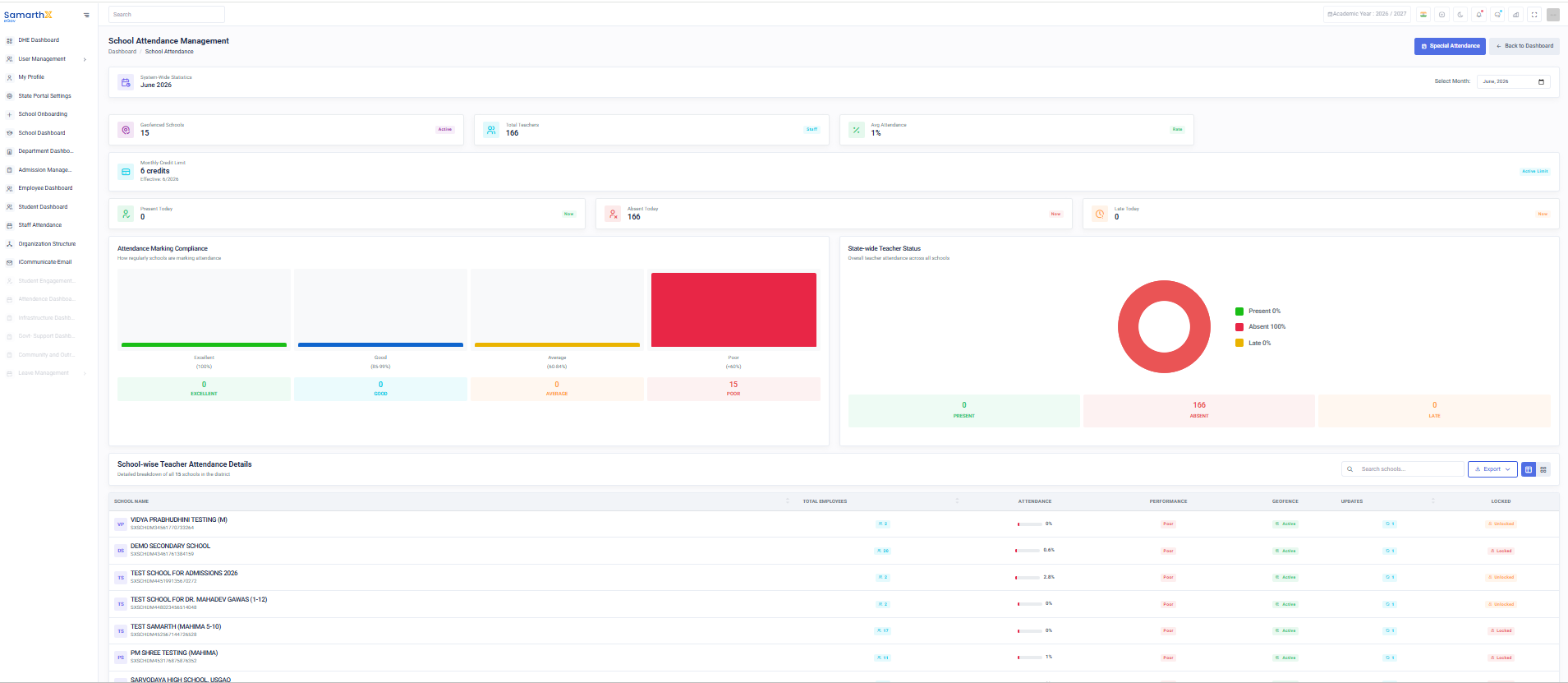
System-Wide Statistics (June 2026)
- Certified Schools: 15
- Total Teachers: 166
- Average Attendance: 1%
- Monthly Credit Limit: 6 credits (valid till June 2026)
Daily Attendance Snapshot
- Present Today: 0
- Absent Today: 166
- Late Today: 0
Attendance Marking Compliance
Compliance categories for schools:
- Excellent: 0
- Good: 0
- Average: 0
- Poor: 15 (100%)
State-wide Teacher Status
Donut chart representation:
- Present: 0%
- Absent: 100% (166 teachers)
- Late: 0%
Key Insights
- All 166 teachers are marked absent today.
- Attendance compliance is poor across all 15 schools.
- No teachers marked as present or late.
- The dashboard highlights a critical compliance issue requiring immediate attention.
Staff Attendance Dashboard
Overview
The Staff Attendance Dashboard provides administrators with a centralized view of staff attendance statistics, geofence configuration, and monthly attendance performance for a school.
[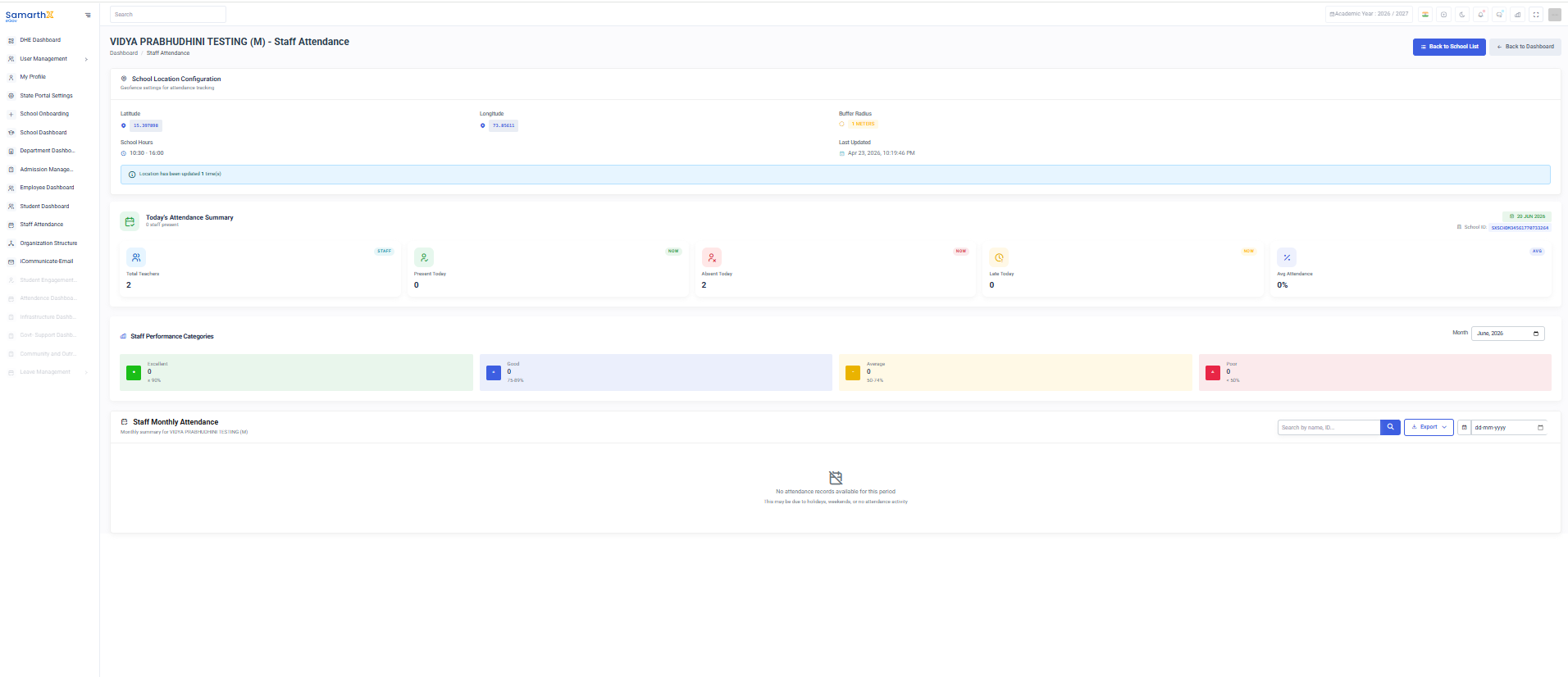
School Name: VIDYA PRABHUDHINI TESTING (M)
Navigation
Dashboard → Staff Attendance
School Location Configuration
The School Location Configuration section manages geofence settings used for attendance tracking.
Configuration Details
| Field | Description |
|---|---|
| Latitude | School location latitude coordinate |
| Longitude | School location longitude coordinate |
| Buffer Radius | Allowed attendance marking radius around the school |
| School Hours | Official school working hours |
| Last Updated | Date and time of last location update |
Purpose
- Configure attendance geofencing.
- Restrict attendance marking to authorized locations.
- Monitor location update history.
Today's Attendance Summary
Provides a quick overview of staff attendance for the selected day.
Summary Metrics
| Metric | Description |
|---|---|
| Total Teachers | Total number of teaching staff |
| Present Today | Number of staff marked present |
| Absent Today | Number of staff marked absent |
| Late Today | Number of staff marked late |
| Avg Attendance | Average attendance percentage |
Additional Information
- Attendance Date
- School ID
- Real-time attendance status
Staff Performance Categories
Displays attendance performance distribution for the selected month.
Categories
| Category | Attendance Percentage |
|---|---|
| Excellent | ≥ 90% |
| Good | 75% – 89% |
| Average | 50% – 74% |
| Poor | < 50% |
Purpose
- Monitor employee attendance trends.
- Identify attendance improvement opportunities.
- Track monthly attendance performance.
Staff Monthly Attendance
Provides a monthly attendance summary for all staff members.
Features
- Search by Employee Name
- Search by Employee ID
- Monthly attendance records
- Attendance percentage tracking
Available Information
- Employee Name
- Employee ID
- Present Days
- Absent Days
- Late Entries
- Attendance Percentage
User Actions
View Daily Attendance
View Monthly Attendance
- Scroll to Staff Monthly Attendance section.
- Search using employee name or ID.
- Review attendance details.
Update Geofence Settings
- Open School Location Configuration.
- Update location coordinates or radius.
- Save changes.
Note: Only authorized users can modify geofence settings.
Attendance Workflow
Staff Login
      ↓
Location Verification
      ↓
Attendance Marking
      ↓
Attendance Recording
      ↓
Dashboard Update
      ↓
Monthly Reporting
Purpose
The Staff Attendance Dashboard enables schools and administrators to monitor attendance, manage geofence configurations, and analyze staff attendance performance through a centralized interface.
No comments to display
No comments to display