
Department Dashboard- Department Name-User guide
Overview
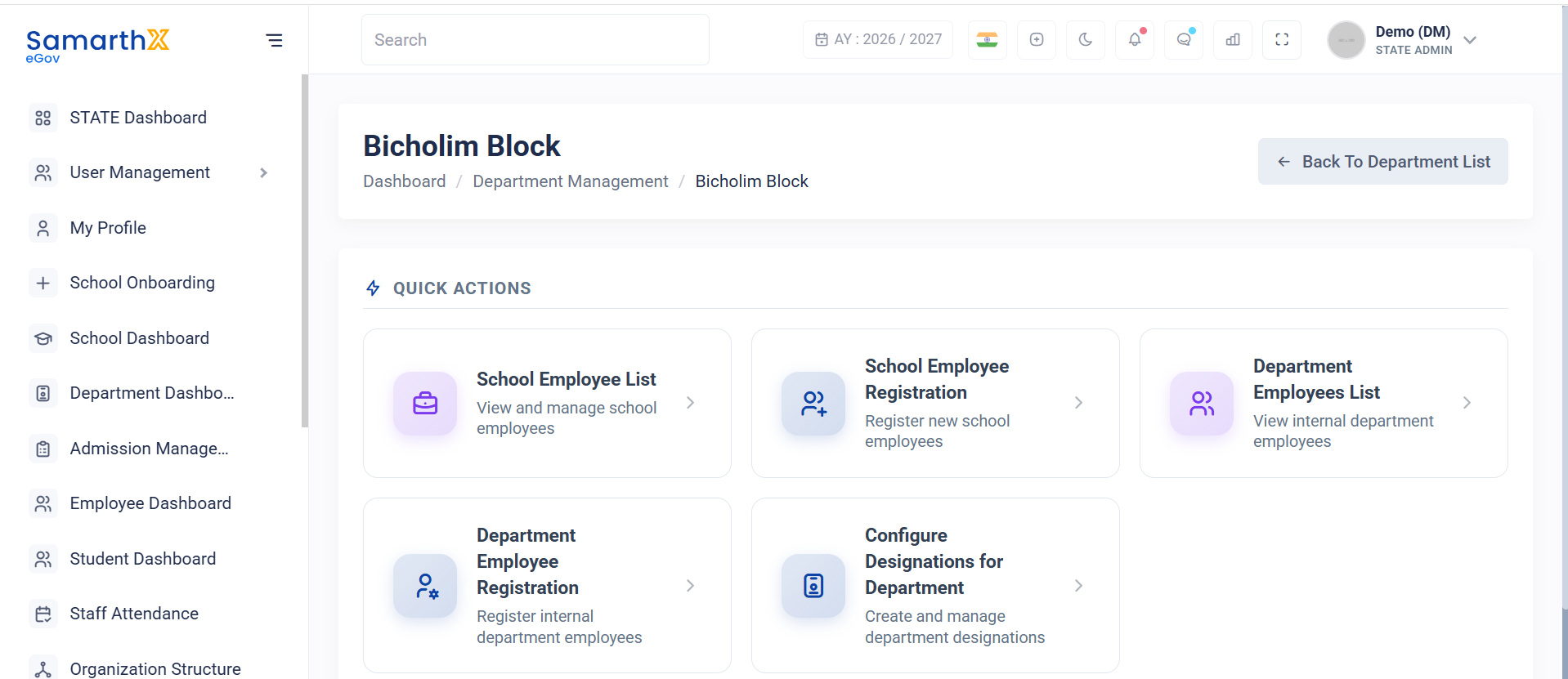
The Department Dashboard serves as the landing page for a selected department and provides quick access to employee management and designation configuration functions. It enables administrators to manage department staff, school employees, and department-specific designations from a centralized location.
Navigation
State Dashboard → Department Management → Select Department
Access Permission
| Role | Access |
|---|---|
| State Admin | View and Manage Department Dashboard |
Department Information
The dashboard displays the selected department name at the top of the page.
Example
Bicholim Block
Quick Actions
The dashboard provides the following quick access options:
School Employee List
Purpose:
View and manage employees associated with schools under the selected department.
Available Actions:
- View employee records
- Search employees
- Review employee details
- Manage employee information
School Employee Registration
Purpose:
Register new school employees within schools associated with the selected department.
Available Actions:
- Add new employee records
- Enter employee information
- Assign employee details
- Submit employee registration
Department Employees List
Purpose:
View and manage employees directly associated with the selected department.
Available Actions:
- View department employee records
- Search employees
- Review employee information
- Monitor department staffing
Department Employee Registration
Purpose:
Register employees who belong directly to the department.
Available Actions:
- Create employee records
- Enter employee information
- Assign department roles
- Submit registration requests
Configure Designations for Department
Purpose:
Create and manage department-specific designations.
Available Actions:
- Create new designations
- Update existing designations
- Configure designation hierarchy
- Manage department roles and responsibilities
Dashboard Workflow
Department Management
        │
        ▼
Select Department
        │
        ▼
Department Dashboard
        │
        ├── School Employee List
        │
        ├── School Employee Registration
        │
        ├── Department Employees List
        │
        ├── Department Employee Registration
        │
        └── Configure Designations for Department
User Actions
Administrators can:
- Access employee management functions
- Register school employees
- Register department employees
- Review employee records
- Configure department designations
- Manage department workforce structure
Notes
- Dashboard actions are specific to the selected department.
- Employee management options are separated into school-level and department-level functions.
- Designation configuration impacts employee role assignments and organizational hierarchy.
- Access to dashboard functions is controlled through role-based permissions.
No comments to display
No comments to display