
Department Employee Directory
Overview
The Department Employee Directory provides a consolidated list of employees associated with a department and its sub-departments. Administrators can search employee records, review designation details, and monitor workforce distribution across the department hierarchy.
Navigation
Department Dashboard → Employee Directory
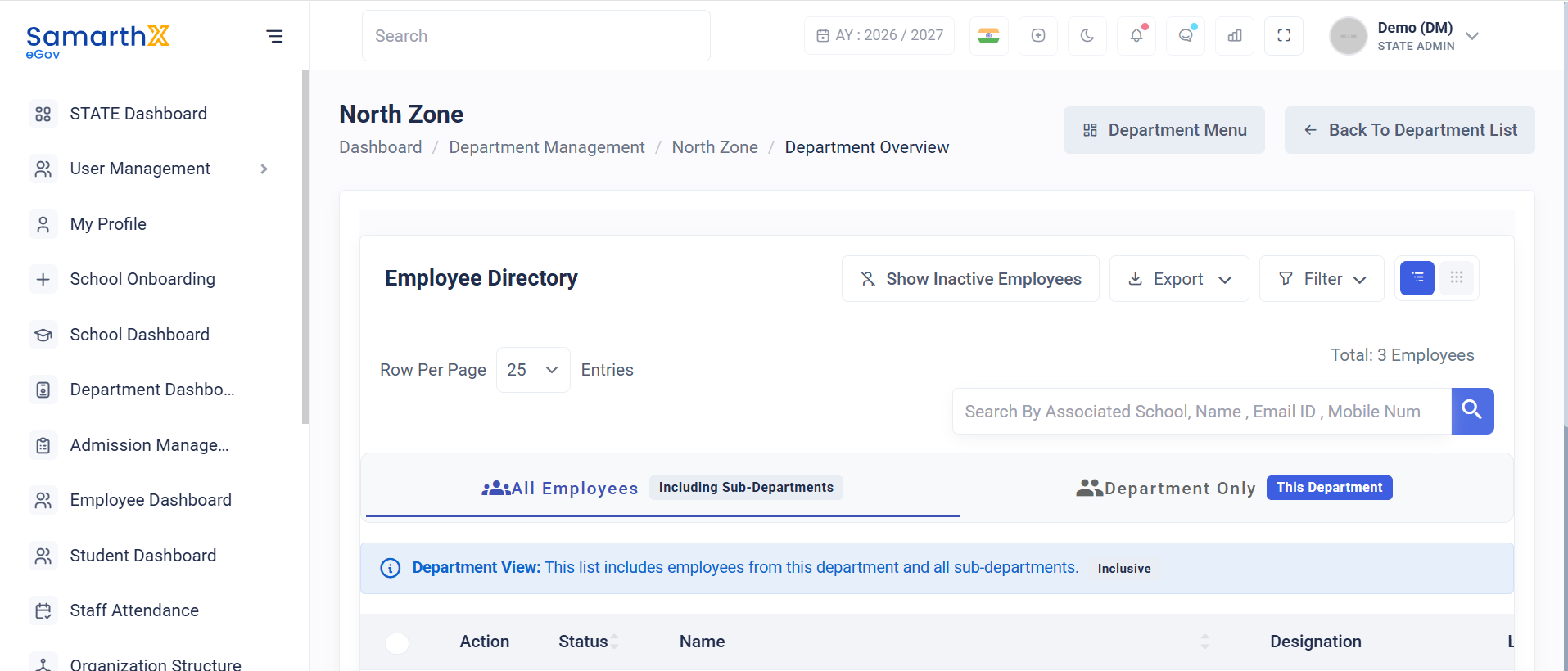
Department Overview
The Employee Directory displays all employees associated with the selected department based on the chosen department scope.
Example
Total: 3 Employees
Search Employees
Administrators can search employee records using:
- Associated School
- Employee Name
- Email ID
- Mobile Number
- Teacher National Code
Directory Filters
Employee Filter
Available option:
- All Employees
Department Scope Filter
Available options:
- Including Sub-departments
- Department Only
Including Sub-departments
Displays employees belonging to:
- Selected department
- Child departments
- Associated organizational units
The system displays:
Department View: This list includes employees from this department and all sub-departments.
Employee Information
The employee directory displays the following details:
| Field | Description |
|---|---|
| Action | Available actions for employee records |
| Status | Indicates whether the employee belongs to a sub-department or selected department |
| Name | Employee name |
| Designation | Assigned employee designation |
| Login Credentials | Registered email address and mobile number |
Status Indicators
| Status | Description |
|---|---|
| Sub-department | Employee belongs to a child department within the selected hierarchy |
| Department | Employee belongs directly to the selected department |
Sample Employee Records
| Name | Designation | Status |
|---|---|---|
| Ms. Bicholim CRP | Cluster Resource Person | Sub-department |
| Ms. Test Department Employee Dgfvh Djhbdh | Cluster Resource Person | Sub-department |
| Ms. Test Employee Hdsbfhj Hdfbjf | Cluster Resource Person | Sub-department |
Designation Information
Example designation displayed in the directory:
Cluster Resource Person
(CRP/NO/BIC/PO)

Cluster Resource Person
(CRP/KU/QP/MALK)
The designation code helps identify the employee's assigned organizational role and location hierarchy.
User Actions
Administrators can:
- View employee records
- Search employee information
- Review employee designations
- Monitor department workforce allocation
- View employee contact information
- Filter records by department scope
Notes
- Employees displayed depend on the selected department scope filter.
- The Including Sub-departments option displays employees from all child departments under the selected department hierarchy.
- Employee login credentials include the registered email address and mobile number.
- Designation codes provide additional context about employee assignments and reporting structures.
- Access to employee information is governed by role-based permissions.
No comments to display
No comments to display