
Student Admission Form – Admission & Academic Details
Overview
The Admission & Academic Details section captures the student's previous educational information and academic performance details required for admission.
Navigation
Student Admission Portal → My Applications → Student Admission Form → Step 2: Admission & Academic Details
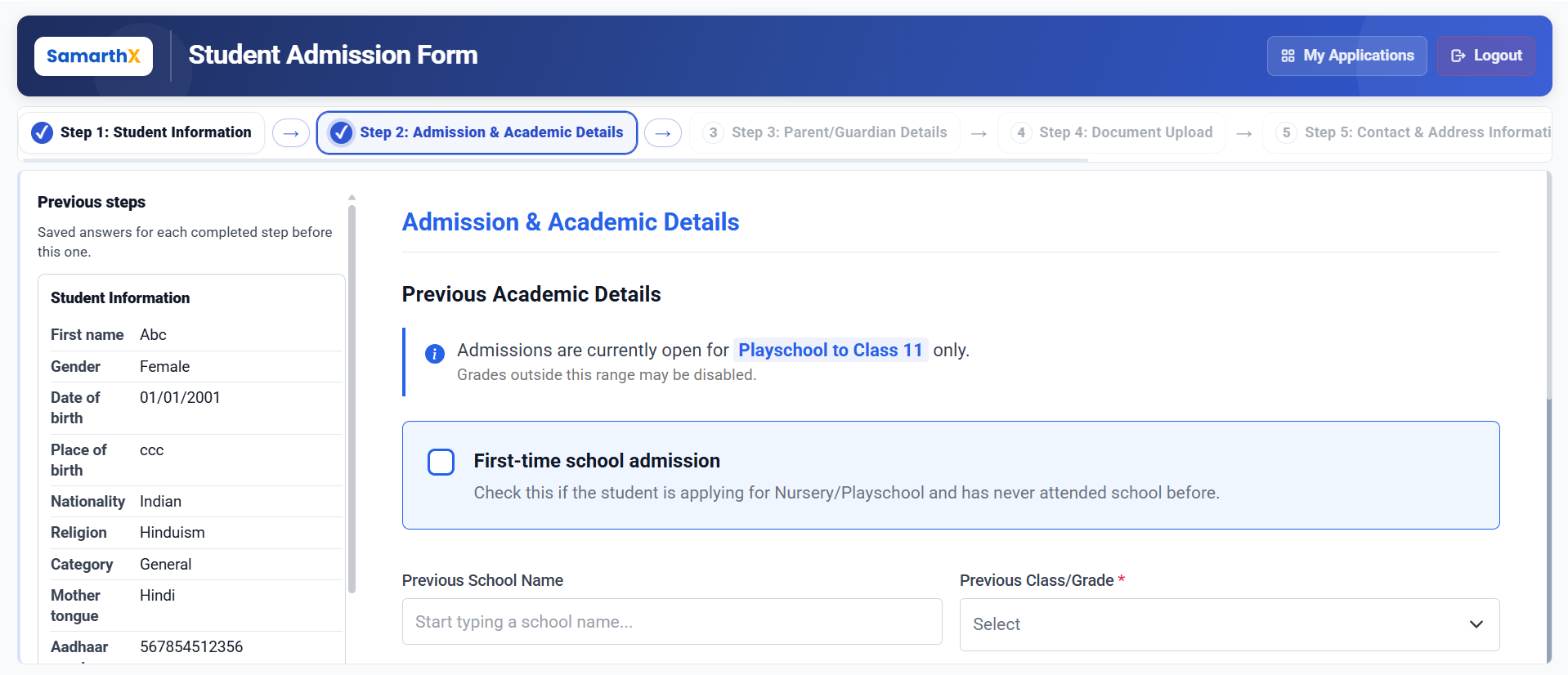
Admission & Academic Details
This step allows applicants to review previously entered student information and provide details about the student's educational background.
Student Information Summary
The following information from Step 1 is displayed for reference:
| Field | Description |
|---|---|
| First Name | Student's first name |
| Gender | Student's gender |
| Date of Birth | Student's date of birth |
| Place of Birth | Student's place of birth |
| Nationality | Student's nationality |
| Religion | Student's religion |
| Category | Student's category |
| Mother Tongue | Student's mother tongue |
| Aadhaar Number | Student's Aadhaar number |
| Person with Disability | Disability status |
Previous Academic Details
Provide information about the student's last attended school and academic performance.
Fields
| Field | Description |
|---|---|
| Previous School Name | Enter or search for the previously attended school |
| Previous Class/Grade* | Select the last completed class or grade |
| Medium of Instruction | Select the medium of instruction |
| Previous Board | Select the education board |
| Specify Board Name* | Enter the board name when Others is selected |
| Total Marks* | Enter the total marks for the examination |
| Marks Obtained* | Enter the marks secured by the student |
| Board Percentage | Automatically calculated based on Total Marks and Marks Obtained |
| Previous Class Result Status* | Select whether the student passed or failed the last completed class |
| Is Student Migrated?* | Indicate whether the student is transferring from another school |
| School Leaving Certificate Number | Enter the School Leaving Certificate number, if applicable |
Note: Admissions are currently open for Playschool to Class 11 only. Classes outside this range may not be available for selection.
Note: For Playschool to UKG admissions, certain academic fields may not be applicable.
Automatic Calculations
Board Percentage
The system automatically calculates the Board Percentage using the following formula:
Board Percentage = (Marks Obtained ÷ Total Marks) × 100
No manual calculation is required.
Available Actions
| Action | Description |
|---|---|
| Previous | Returns to the Student Information step |
| Save & Next | Saves the entered information and proceeds to the Parent/Guardian Details step |
Workflow
Student Information
        │
        ▼
Admission & Academic Details
        │
        ▼
Previous Academic Details
        │
        ▼
Academic Performance Information
        │
        ▼
Save & Next
        │
        ▼
Parent/Guardian Details
Important Notes
- Fields marked with (*) are mandatory.
- Ensure previous school and academic details are entered accurately.
- Board Percentage is calculated automatically by the system.
- School Leaving Certificate details may be required for migrated students.
- Academic information should match the supporting documents uploaded during the admission process.
- Review all information before proceeding to the next step.
No comments to display
No comments to display