
Attendence Details-User Guide
My Attendance
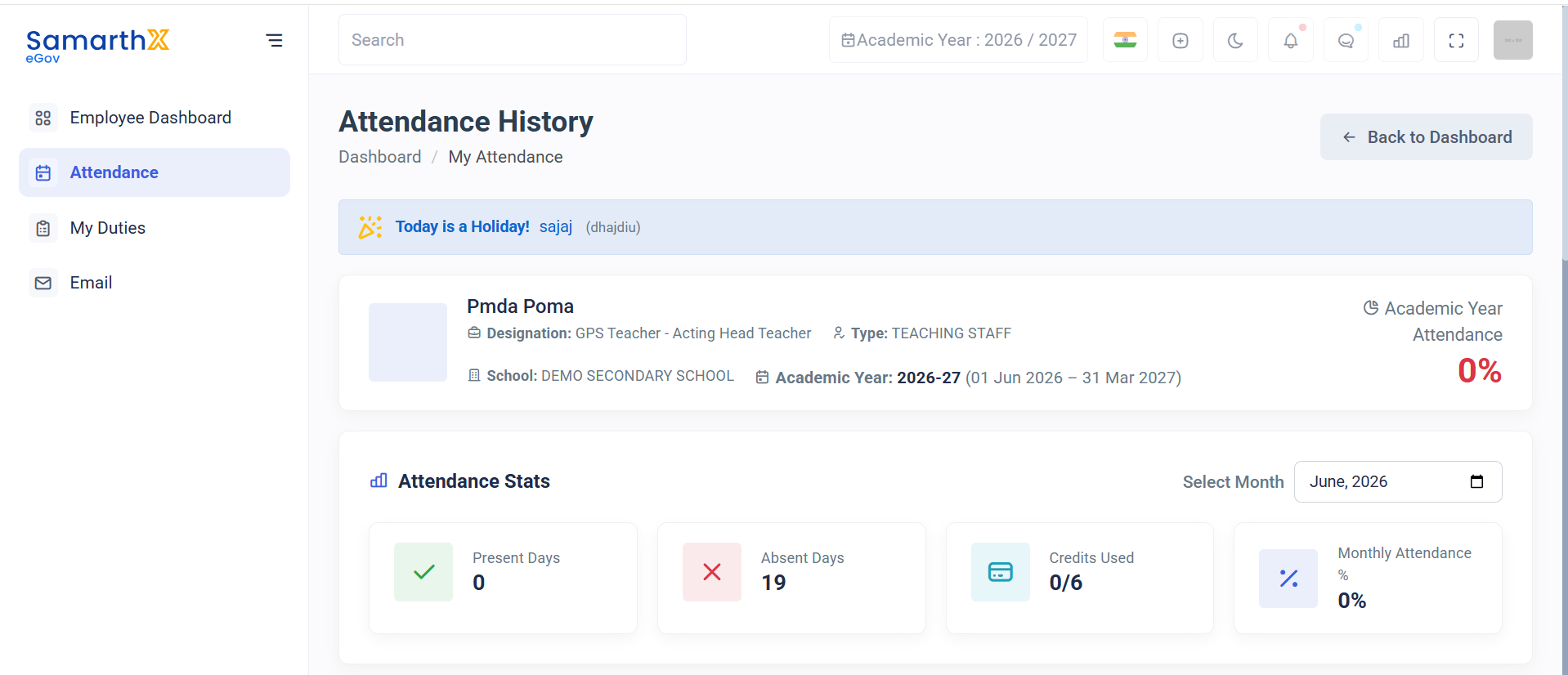
Overview
The My Attendance page allows employees to view attendance records, monthly statistics, and attendance calendars for the selected academic year.
Employee Information
| Field | Value |
|---|---|
| Employee Name | School reg teaching emp detail |
| Designation | Test Designation - Test1 |
| Employee Type | Teaching Staff |
| School | SCHOOL1 |
| Academic Year | 2026-27 (01 Jun 2026 – 31 Mar 2027) |
Attendance Summary
| Metric | Value |
|---|---|
| Academic Year Attendance | 0% |
| Present Days | 0 |
| Absent Days | 19 |
| Credits Used | 0 / 6 |
| Monthly Attendance | 0% |
Selected Month: June 2026
Monthly Attendance Calendar
Displays attendance status for each day of the selected month.
Tap a present day to view punch-in and punch-out details.
Attendance Legend
| Symbol | Meaning |
|---|---|
| P | Present |
| A | Absent |
| PL | Present (Late) |
| R | Regularised |
| OD | On Duty |
| FD | Future Duty |
| H | Holiday |
| SA | Special Attendance |
| S | Special Attendance (Admin Marked) |
| CI | Check-In Only |
Export Attendance
Download the attendance calendar for the selected month.
Features
- Monthly attendance tracking
- Academic year attendance overview
- Attendance statistics
- Holiday visibility
- Punch detail viewing
- Attendance export/download
No comments to display
No comments to display