
Employee Directory-Department Only-Teaching Staff
Page 2: Overview
The Employee Directory displays employee records based on the selected department scope and employee category filters.
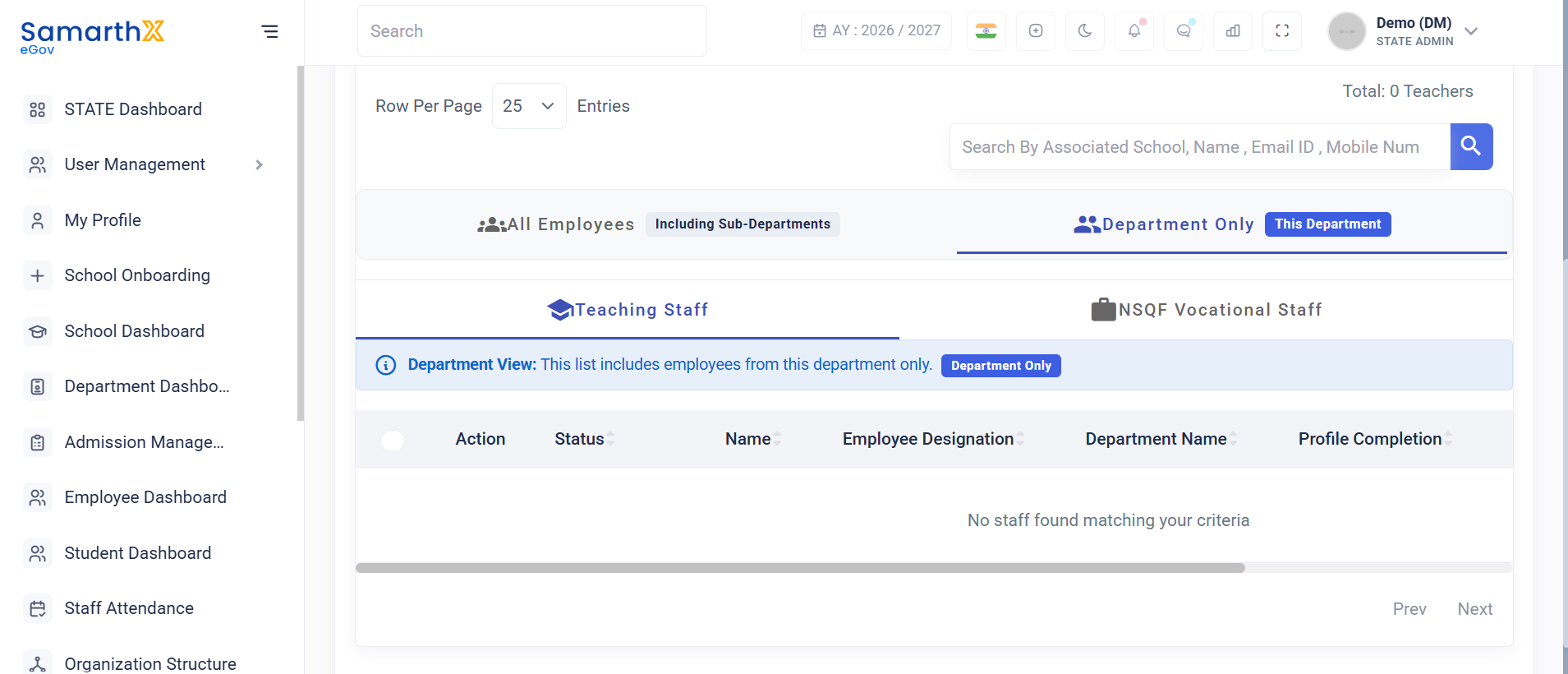
Search Employees
Users can search employee records using:
- Associated School
- Employee Name
- Email ID
- Mobile Number
- Teacher National Code
Employee Category Filters
Available options:
- All Employees
- Teaching Staff
- NSQF Vocational Staff
Department Scope Filters
Available options:
- Including Sub-departments
- Department Only
Department Only
Displays employees assigned directly to the selected department.
The system displays the following indicator when this filter is selected:
Department View: This list includes employees from this department only.
Employee Information
The employee directory displays the following information:
| Field | Description |
|---|---|
| Action | Available actions for the employee record |
| Status | Employee ownership within the department hierarchy |
| Name | Employee name |
| Employee Designation | Assigned designation |
| Department Name | Associated department |
| Profile Completion | Employee profile completion percentage |
| Login Credentials | Registered email address and mobile number |
| Date of Joining | Employee joining date |
Empty State
When no employee records match the selected filters or search criteria, the system displays:
No staff found matching your criteria
Possible reasons include:
- No employees assigned directly to the selected department
- No employees available for the selected employee category
- Search criteria returned no matching records
- Employee records have not yet been registered
Notes
- The Department Only filter excludes employees from sub-departments.
- Search results are dynamically updated based on selected filters.
- Employee records displayed depend on both department scope and employee category selections.
- NSQF Vocational Staff can be managed only by authorized DHE administrators.
No comments to display
No comments to display