
Step 6: School & Class Selection – Admission Form
Overview
The School & Class Selection step allows applicants to search, filter, and select preferred schools based on eligibility criteria such as grade, board, stream preference, and location. Selected schools are saved as part of the admission application and used for further processing in the admission workflow.
Navigation Flow
Student Information → Admission & Academic Details → Parent/Guardian Details → Document Upload → Contact & Address Information → School & Class Selection → Declaration & Agreement
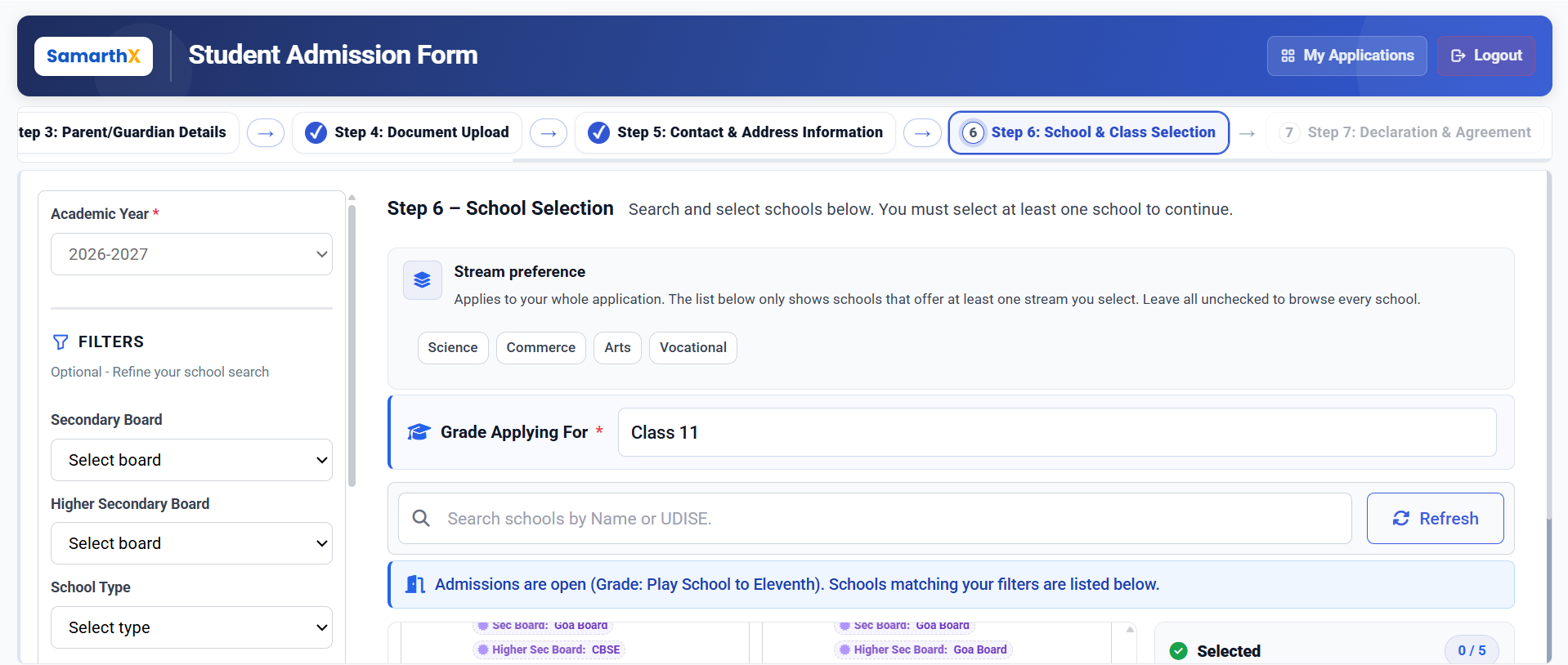
Academic Context
- Academic Year: 2026–2027
- Grade Applying For: Class 11 (example)
- Stream Preference: Optional (applies globally to school listing)
Filters Section (Optional)
Filters help refine school search results.
Available Filters:
- Secondary Board
- Higher Secondary Board
- School Type
- District
- Educational Block
- State (Default: Goa)
Actions:
- Reset Filters: Clears all applied filters
- Apply Filters: Refreshes school listing based on selected criteria
School Search
Search Options:
- School Name
- UDISE Code
Search results are dynamically filtered based on:
- Grade eligibility
- Stream preference
- Selected filters
School Listing Information
Each school card includes:
- School Name
- UDISE Code
- School Type (Govt / Private / Aided / Central / Special Needs)
- District / Block
- Grade Range Offered
- Secondary Board
- Higher Secondary Board
- Admission Status (Open / Closed)
Admission Status Rules:
- Open: Eligible for selection
- Closed: Displayed but disabled for selection
Selection Rules
- Minimum selection: 1 school
- Maximum selection: 5 schools
- Only eligible schools can be selected
- Selections are stored per application
- Selected schools persist until final submission
Selected Schools Panel
Displays:
- Count of selected schools (e.g., 2 / 5)
- List of selected schools
- Option to remove selected schools
Updates dynamically as user modifies selections.
Business Logic
Eligibility Criteria:
- Grade must match applied class
- School must offer selected stream (if specified)
- School must pass filter conditions
Validation Rules:
- At least 1 school must be selected to proceed
- Maximum limit is enforced at 5 selections
- Admission closed schools are non-selectable
Workflow
Step 1: Load Profile
Load applicant academic profile
Step 2: Fetch Schools
Fetch eligible schools based on grade, stream preference, and applied filters
Step 3: Display List
Display filtered list of schools
Step 4: Search & Filter
Allow search and filter refinement
Step 5: Selection
Enable selection of up to 5 schools
Step 6: Validation
Validate selection constraints (minimum 1, maximum 5, eligibility rules)
Step 7: Save State
Save selected schools to application state
Step 8: Enable Action
Enable Save & Continue button
Step 9: Next Step
Proceed to Step 7: Declaration & Agreement
Output State
After successful completion:
- Selected schools are saved in application record
- Step 6 marked as complete
- User proceeds to final declaration step
No comments to display
No comments to display