
User Management-User Guide-School Designations & Permissions-Create Designation
Overview
The Create Designation page allows authorized administrators to create new employee designations and define their classification, scope, and administrative privileges.
Note: Designations with the Employee Type set to Vocational Employee can only be created and managed by the Directorate of Higher Education (DHE). Schools cannot create or modify vocational designations.
Navigation
Dashboard → Designations & Permissions → Create Designation
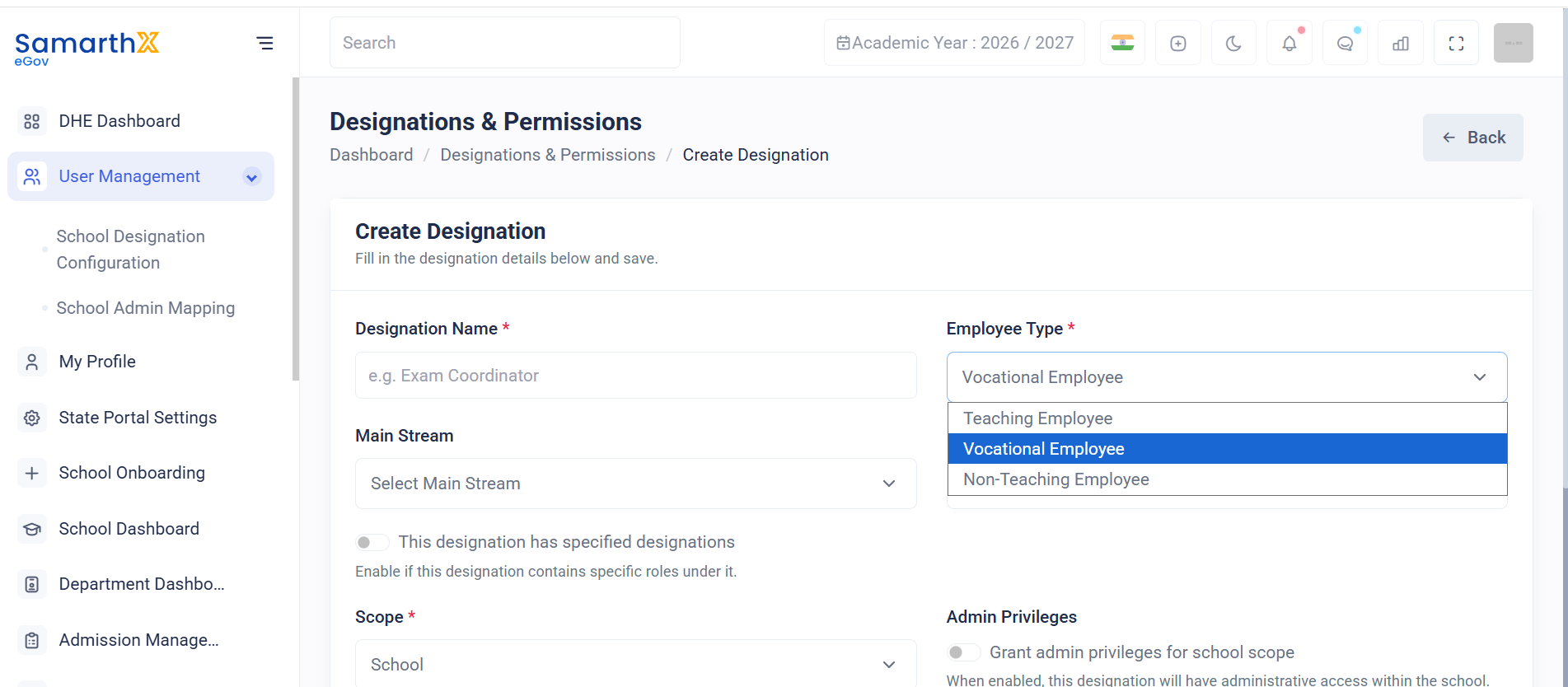
Designation Details
Fill in the required information to create a new designation.
| Field | Description |
|---|---|
| Designation Name* | Enter the official designation name (e.g., Exam Coordinator). |
| Employee Type* | Select the employee category (Teaching, Non-Teaching, or Vocational Employee). |
| Main Stream | Select the applicable employee stream. |
| Nature of Appointment | Select the appointment type associated with the designation. |
| This designation has specified designations | Enable if the designation contains specific roles or sub-designations under it. |
| Scope* | Select the administrative scope of the designation (e.g., School). |
| Admin Privileges | Grant administrative privileges within the selected scope. |
| Description | Optional description for the designation. |
Admin Privileges
When Admin Privileges is enabled:
- The designation receives administrative access within the selected scope.
- Additional management and configuration permissions may be available based on system settings.
Create a Designation
Important Notes
- Fields marked with (*) are mandatory.
- Designation names should be unique within the organization.
- Administrative privileges should only be granted to authorized roles.
- Vocational Employee designations are managed exclusively by DHE and are not available for school-level creation or modification.
No comments to display
No comments to display