
Designations & Permissions
Overview
The Designations & Permissions module allows administrators to view and manage designations configured for a department. The module provides visibility into designation assignments, employee type mappings, inherited designations, and related permissions.
Navigation
Department Dashboard → Configure Designations for Department
Purpose
This module helps administrators:
- View department designations
- Review employee type mappings
- Identify inherited designations
- Manage role structures within the department
- Configure designation-based permissions
Designations List
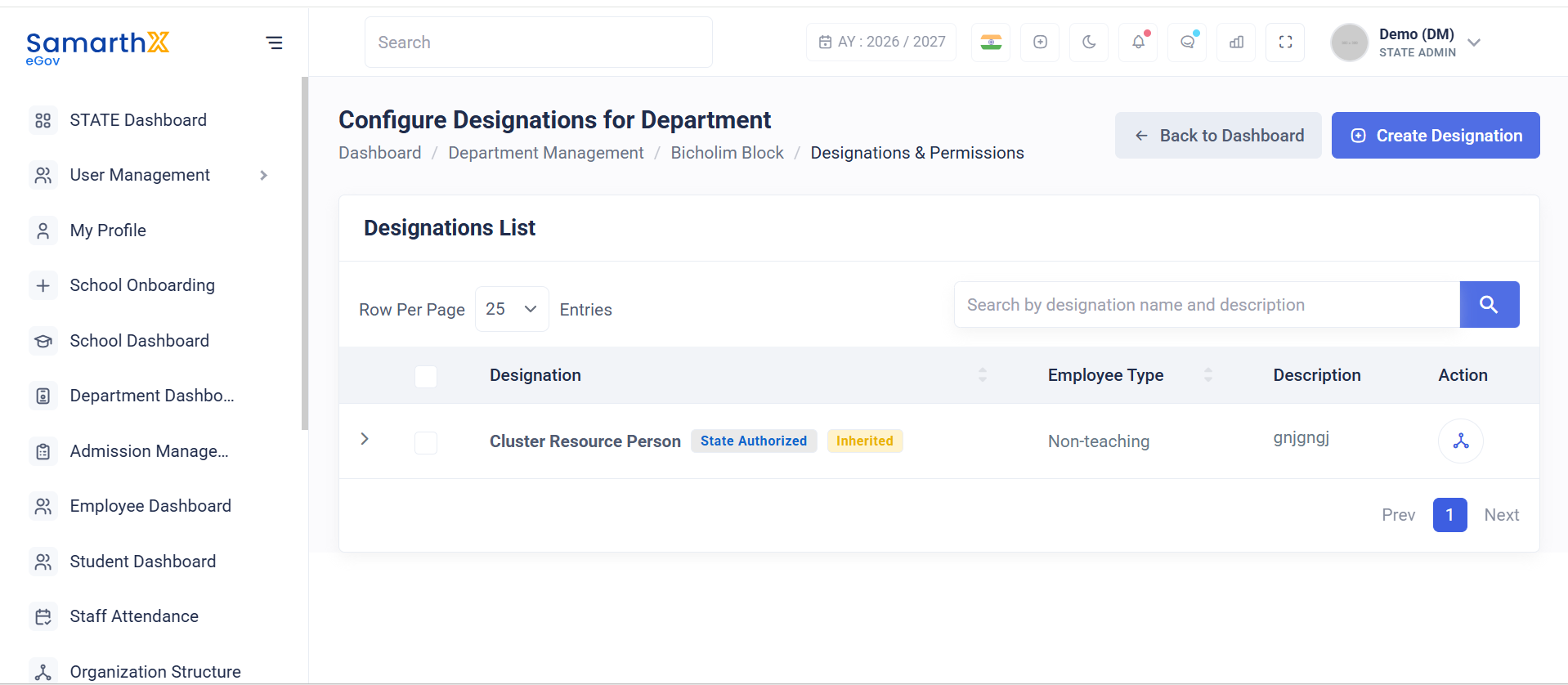
The Designations List displays all designations available to the selected department.
Search Designations
Administrators can search designations using:
- Designation Name
- Designation Description
Designation Information
The designation list displays the following details:
| Field | Description |
|---|---|
| Designation | Name of the designation |
| Employee Type | Employee category associated with the designation |
| Description | Designation description or purpose |
| Action | Available actions for the designation |
Sample Designation Record
| Designation | Employee Type | Description |
|---|---|---|
| Cluster Resource Person | Non-Teaching | gnjgngj |
Designation Source
The system may display designation ownership information.
State Authorized
Indicates that the designation is approved and managed at the state level.
Inherited
Indicates that the designation is inherited from a parent department and is available for use within the selected department.
Example:
Cluster Resource Person
State Authorized
Inherited
Employee Type Mapping
Designations can be mapped to specific employee categories.
Examples:
- Teaching Staff
- Non-Teaching Staff
- Vocational Staff
- Administrative Staff
Example:
Employee Type: Non-Teaching
User Actions
Administrators can:
- View designation records
- Search designations
- Review designation descriptions
- Verify employee type mappings
- Identify inherited designations
- Manage designation permissions based on access rights
Notes
- Designations may be created at the state level and inherited by child departments.
- Inherited designations can be used by departments without creating duplicate records.
- Employee type mappings determine which employees can be assigned a designation.
- Permission management is controlled through role-based access policies.
- Visibility of actions depends on administrator privileges and department configuration.
No comments to display
No comments to display